
Header Wallpaper

NEW - AstroChronos

AvatarDesdemona_6661 min to read

What:

Application for calculating planetary hours, similar to old ChronosXP.

Why:

ChronosXP still works, but development seems to have stopped. Also, there is no ChronosXP for Mac, Linux, Android and iOS, and those are coming too.

How:
It's simple. On Windows, only requirement is .NET 6.0.

First version will be for Windows made in WPF. There will also be version made in WinUI 3, with support for dark theme and visual effects of Windows 10 and 11.

Next on the list are Linux, Mac and Android versions. iOS version might come eventually, but Apple wants $99 per year in order to host your app on their store, and I have to weigh that one out first. However, if people really want it, it will happen, one way or another.

Share all your suggestions and potential problems encountered in this thread.

Where's the source code?

Coming soon, will be hosted on Bitbucket, most likely.

Link:

https://www.dropbox.com/scl/fi/lt9ctyb9t1yxcqcqm79xf/astrochronos_1.0.0_x86.exe?rlkey=c1r71jby8mup2x5fgh848qqcy&dl=0

"You will be here as long as I am here and that is forever."

#1

You are amazing! waiting for the Linux version :)

#2

For the time being, do not trust any other links provided elsewhere. When I change where I host the app, I will notify everyone in this thread. Any other links are not to be trusted.

"You will be here as long as I am here and that is forever."
#3
Larissa666said:

Image Preview
(Click to view larger images)

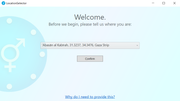
Desktop Shortcut

Setup

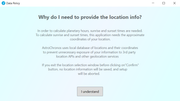
Data Policy

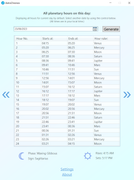
User Interface

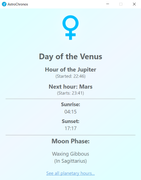
Planetary Hours

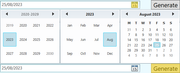
Date Selection

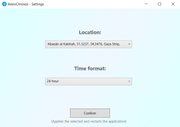
Settings

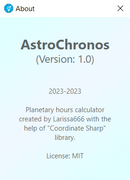
About

It also displays desktop notifications, "Day of the <x>, Hour of the <y>".
Easy to install, configure and use. Good logo. I like it! 😄
One critique: Had to reinstall AstroChronos to change location after the initial setup. (Resolved)

#4

I don't think you should try to support different platforms with different software languages. Simply code it to work on the web. Then it can be added inside JoS Astro or outside as a subdomain. I think that would be better. You can talk to HP HC for this.

If the reason you prefer it is to make it work offline, well, I think you can do that on the web as well.

There are also tools you can use to make the website work on the desktop.

Still, great work and thanks for your efforts. I will use it.

#5
This is the targeted message.

Great work!
Larissa666 you are the best :)

#6
Korpisaid:

One critique: Had to reinstall AstroChronos to change location after the initial setup.

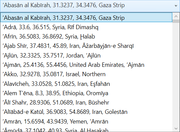
That shouldn’t be happening. In the list view of all hours for current day, there should be two options on bottom, “Settings” and “About”. If you click on “Settings”, you will have 2 option, to select location and to select time format (24/12 hour). If you select new location and click on “Confirm”, app will restart and display information for new location

"You will be here as long as I am here and that is forever."
#7
Larissa666said:

No wonder I couldn't see it. "Settings" and "About" are hidden from view.
The window extends past the full height of my 1920x1080 display.
When I used CTRL+ALT+LEFT/RIGHT to change the orientation of my screen, it revealed these options.
I've updated my post to include what I missed.

#8
Spinesaid:

I don't think you should try to support different platforms with different software languages. Simply code it to work on the web. Then it can be added inside JoS Astro or outside as a subdomain. I think that would be better. You can talk to HP HC for this.

If the reason you prefer it is to make it work offline, well, I think you can do that on the web as well.

There are also tools you can use to make the website work on the desktop.

Sure, I could have written Electron app that works everywhere, but I still prefer native over jack of all trades solutions like Electron. However, if it's really needed, it can be made. Also, yes, I wanted the app that can operate without Internet connection.

Few caveats that I should have mentioned in the initial posts:

1. If you are in polar circle, where during some times of the year sun never rises or sets, this app will not work, as calculation of planetary hours using classic method is not possible. If there is another way to handle those cases, please let me know and I will see if I can implement that.

2. In simple view, data for the Moon phase and sign is updated with every hour change. In detailed view, Moon phase and sign data is displayed for midnight. For example, if you want to display data for August 27th, the Moon data displayed is for August 28th, 00:00 (am). Also, void of course data is not displayed due to the limitation of "Coordinate Sharp" library that app is using. Instead of displaying void of course, it just switches on to the next sign. I might be able to add VoC functionality later.

"You will be here as long as I am here and that is forever."
#9
Korpisaid:
Larissa666said:

No wonder I couldn't see it. "Settings" and "About" are hidden from view.
The window extends past the full height of my 1920x1080 display.
When I used CTRL+ALT+LEFT/RIGHT to change the orientation of my screen, it revealed these options.
I've updated my post to include what I missed.

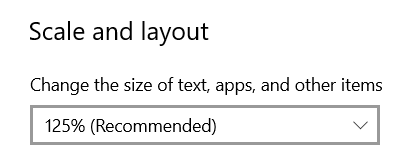
I see. Must be how Windows handles display scaling. Are you running at higher than 100% scaling?

"You will be here as long as I am here and that is forever."
#10
Larissa666said:
Korpisaid:
Larissa666said:

No wonder I couldn't see it. "Settings" and "About" are hidden from view.
The window extends past the full height of my 1920x1080 display.
When I used CTRL+ALT+LEFT/RIGHT to change the orientation of my screen, it revealed these options.
I've updated my post to include what I missed.

I see. Must be how Windows handles display scaling. Are you running at higher than 100% scaling?

Yes.

When I switched to 100%, it displayed without issue. 😅

#11
Korpisaid:
Larissa666said:
Korpisaid:

No wonder I couldn't see it. "Settings" and "About" are hidden from view.
The window extends past the full height of my 1920x1080 display.
When I used CTRL+ALT+LEFT/RIGHT to change the orientation of my screen, it revealed these options.
I've updated my post to include what I missed.

I see. Must be how Windows handles display scaling. Are you running at higher than 100% scaling?

Yes.

Yep, suspected so.

I am not blaming you, some people like their screens that way, and it needs to be respected. Fix coming soon.

"You will be here as long as I am here and that is forever."
#12

Update:

-Fixed issue with display scaling, tested up to 150% on 1080p.
-Hours view layout overhaul.

Link is the same as the one in original post.

"You will be here as long as I am here and that is forever."
#13

Thank you!
I really got bored of chronosxp and this comes quite handy!

I'm still learning, the same way as you do, the same way as we all do.

Zevist Since 15 Jan 2018 | LAURENTUM'S PROJECTS ARCHIVE |

#14

Minor update:

Fixed the bug where if app has been left to run, it wouldn't automatically switch to new planetary day at sunrise without restart.

I already installed the app, do I need to uninstall and install again?

No, just run the installer, it will only overwrite what is necessary and keep everything else that doesn't need to be changed.

"You will be here as long as I am here and that is forever."
#15

Update:

Source code released:
https://github.com/larissaTheFirst/AstroChronos

Other:
Added error handling during polar day and night situations at some parts of the world.
Done some code refactoring.

Link is the same one as in the original post. If you have already installed, just run the installer again, it will only overwrite what it needs to be overwritten, no need for uninstall then install.

This will be the last update for now, I have much other stuff to focus on. What's coming next is Linux version (GTK, probably). Also, I hope I will be able to add void of course Moon functionality at some point in not too distant future hopefully.

I hope you will find this application useful and handy, and as always, if you have any questions, feel free to ask here.

"You will be here as long as I am here and that is forever."
#16

I really like it, any chance to have an Android app in the future? Maybe with Xamarin since you are a C# genius

I'm still learning, the same way as you do, the same way as we all do.

Zevist Since 15 Jan 2018 | LAURENTUM'S PROJECTS ARCHIVE |

#17
ramses13thsaid:

I really like it, any chance to have an Android app in the future? Maybe with Xamarin since you are a C# genius

Xamarin is now .NET MAUI, but yes, as I said already, Android version is coming and it will be written in Java. Only version that I am not sure about is iOS.

"You will be here as long as I am here and that is forever."
#18

Overdue update:

AstroChronos GitHub repository has been archived, will remain up for historical purposes, next update will be written using Windows Forms instead of WPF.

After that, next one in queue is Mac OS version, that one is 50-60 percent complete.

Android and Linux version will drop sometime during either late spring or somewhere during summer.

Apologies for inactivity.

"You will be here as long as I am here and that is forever."

#19

if i chose a place 40 miles away from me does this program still work? my city is not in it