Header Wallpaper

Anonymous Monero Purchasing Guide For JoS Donations And/OrPersonal Use

AvatarThe Alchemist7 [SG]13 min to read

Download Guide in PDF for offline read here:
https://mega.nz/file/JFRTnZ7Y#_4rnPLenF6oufeye7lbGq-Mi-fZvprIKDQs7jKPtyzk

Do not hesitate to ask any questions you might have. It might seem long but is very easy to follow and apply. Once you do 1-2 transactions you will get used to it straight away.

____________________________________

The following Guide provides simple instructions on how to buy the Monero crypto-currency via a method that is nearly impossible to trace back to one’s real identity, and is mostly addressed to members who want to donate to JoS but are not familiar with buying crypto-currencies or using crypto wallets.

The first step is to obtain any wallet from where you can receive and send crypto-currency transactions. Any wallet can be used for this purpose so if you already have one or consider a different wallet, you can skip the following guides for setting up a crypto wallet.

The wallet I’ve been using and I found the easiest to deal with is the Exodus wallet, which should be downloaded only from their official platform (it does not require your real identity or bank details):
https://www.exodus.com/

Open the link and on the top-right corner you should see the Download button:
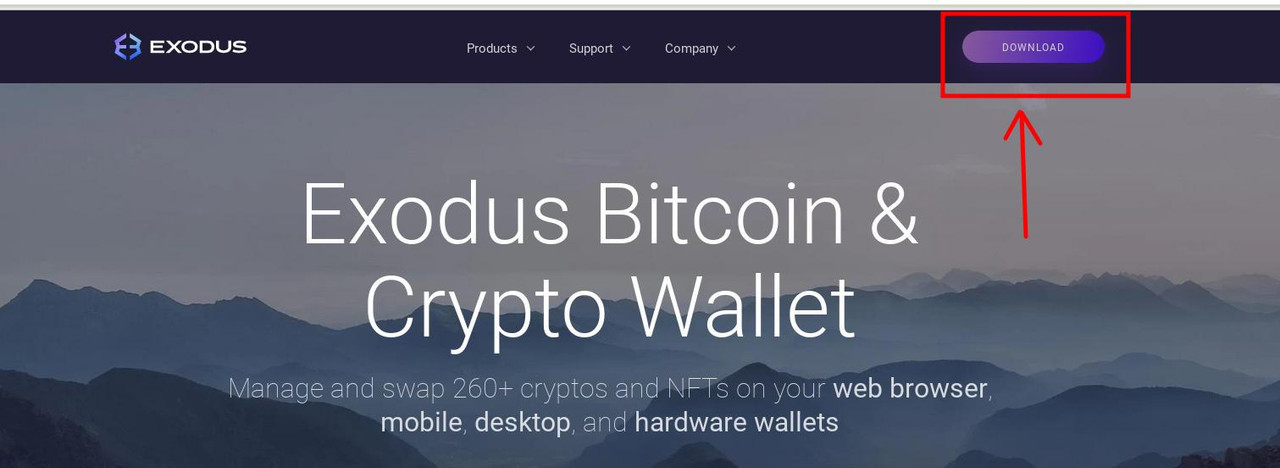
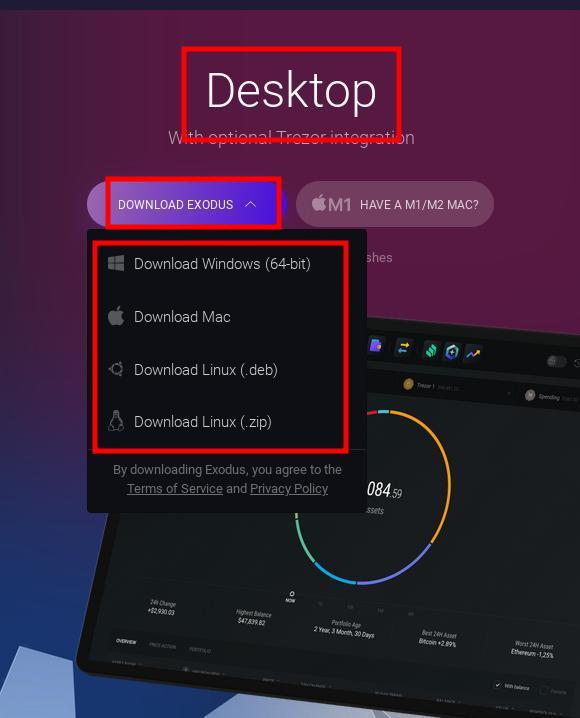
Press the Download option and look for the Desktop app versions (which will likely be on the right-hand side of the newly opened page), press the drop-down “Download Exodus” option and download the correct version for your Operating System:
To install the wallet you can follow this very simple 5 minutes Youtube video which shows everything you need to know to set up the Exodus wallet (for certain Linux Operating Systems, the installation process is mostly the same as for Windows):

How to Install Exodus Wallet Step by Step (2021) | Exodus Wallet Crypto Coins
https://www.youtube.com/watch?v=0a3Bo0eUUvk

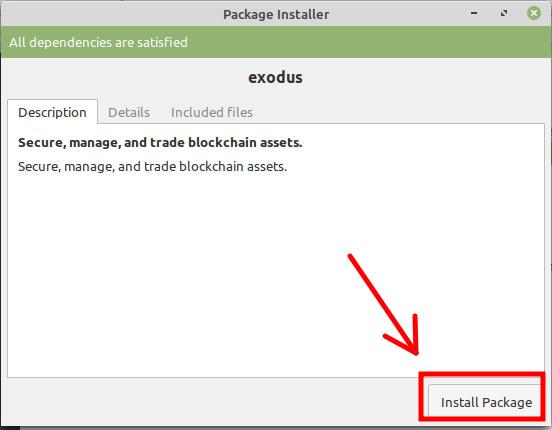
For some Linux distributions you will open the .deb file and press “Install Package

A mention that I have to make here is that you should be extremely cautious when saving your password and 12 words secret phrase. This will allow you to recover your wallet in case of irreparable computer damage or obtaining a new computer. Since is going to be very difficult to impossible to memorize the password and the 12 words secret phrase for long time, there are 2 things you can do:

- Write them in a document or simple text file and save it on a USB stick or a storage device that does not have access to internet;

- Write them on a physical piece of paper and hide the paper in a place that only you know about, and also where its integrity can be preserved so it doesn’t get damaged in time;

How To buy Monero

Create an account on the platform
www.localmonero.co
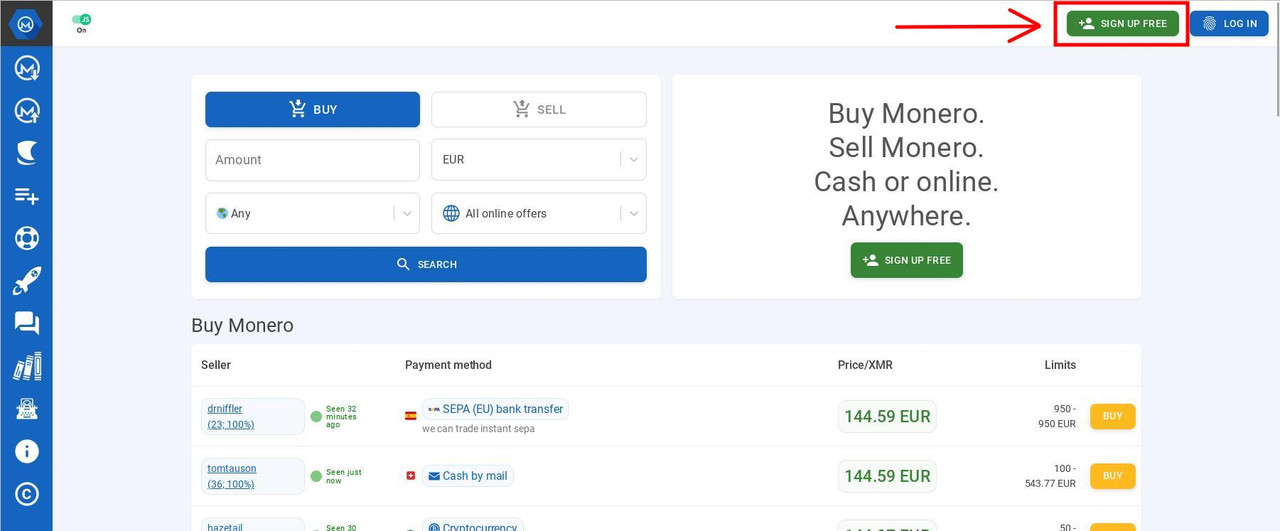
Fill in an Username and Password which you must keep safely, ideally together with the Exodus Password and Secret 12 Words Phrase (or the details of your other wallet if so).
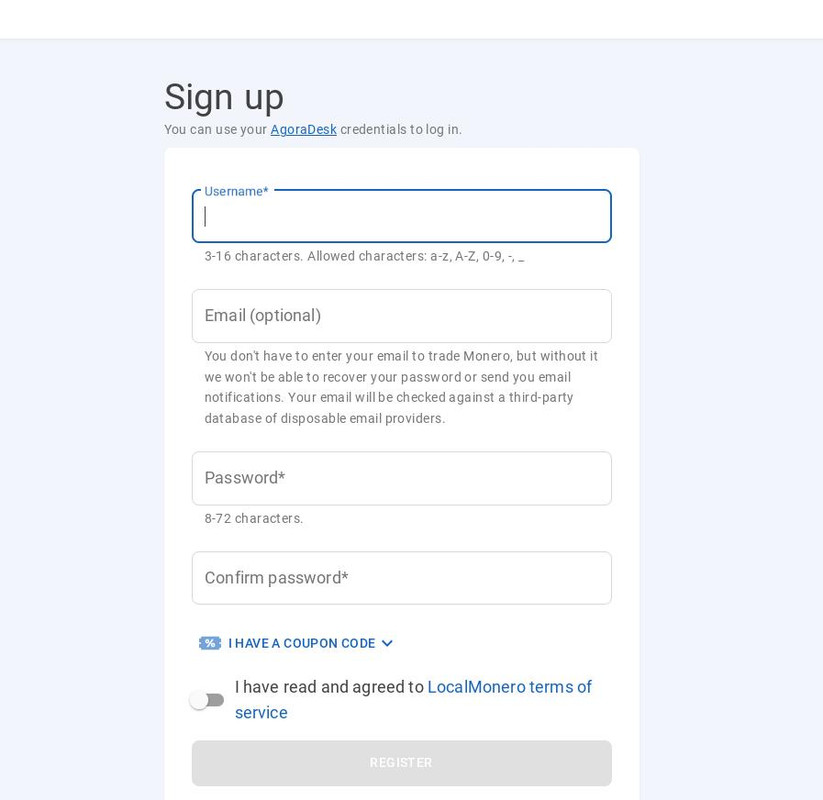
You don’t need to use an email mandatorily, however validating an email address will allow you access to sellers who only accept customers with verified email. If you decide to use an email, do not use your real life email address. Instead, use the address that you use on our forums or create an anonymous email address on protonmail or another platform, except of email platforms that provide disposable email addresses as you will need a stable email.

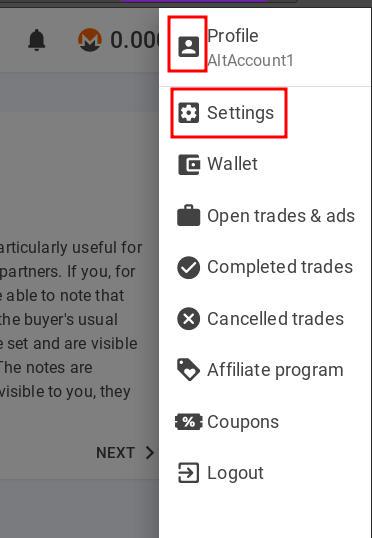
For registering you can skip adding an email and if you need to, can add it any time afterwards by going to the top-right corner of the platform and clicking the account option and then click Settings:
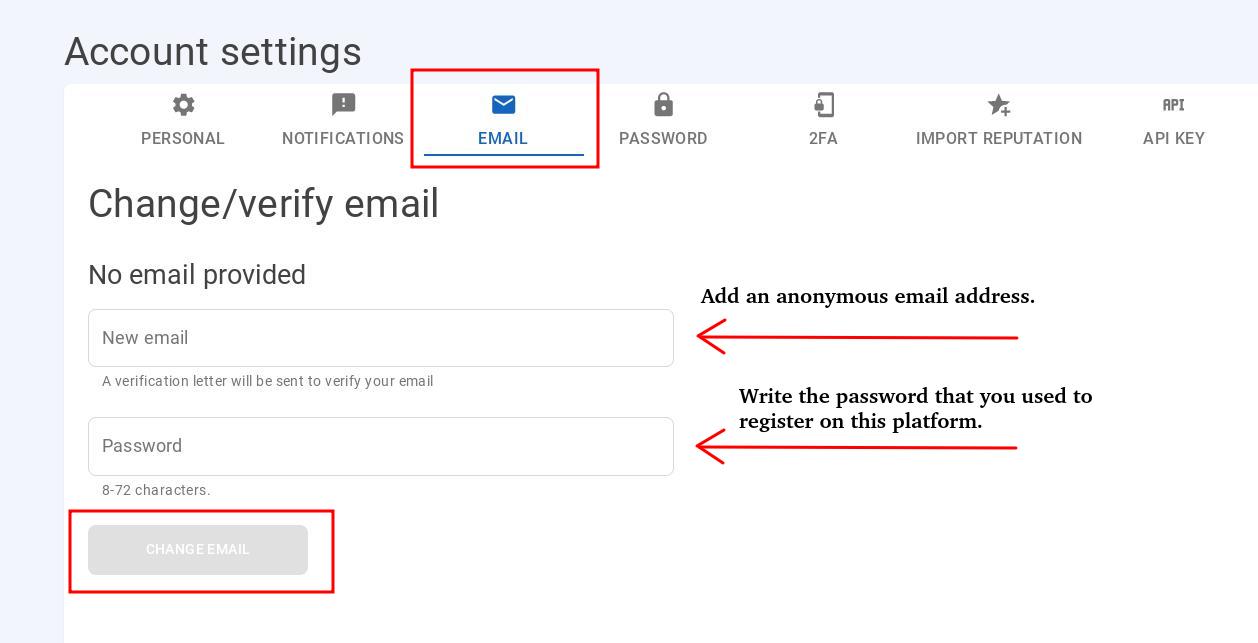
Then go to Email, fill in the email that you want to add, the password that you used to register on Local Monero and click “Change Email”. The platform will likely send a confirmation link to your email inbox, which you will need to click in order for your email to be verified.
That’s It – You are now ready to buy Monero

Once your account is set up, you can go to the homepage and fill in country you are buying from, the currency, amount and payment method and then click SEARCH.
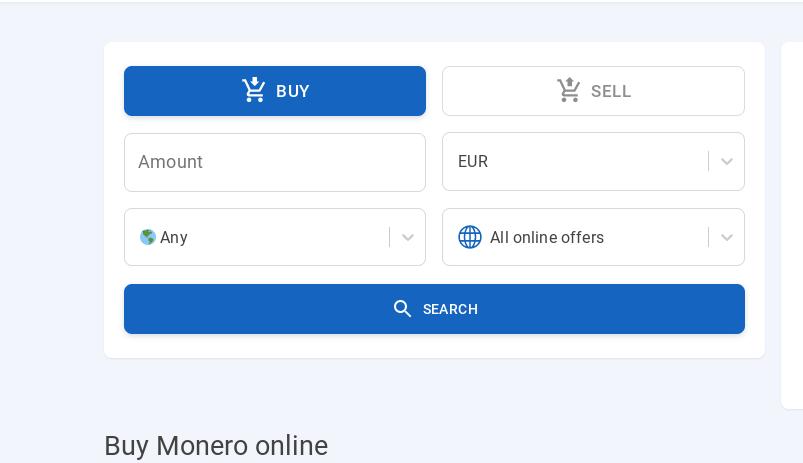
There is a wide range of payment methods accepted, the most popular being Direct Bank Transfer, Paypall, Cash by Email, Transferwise etc.

For example purposes we will fill in the details to buy $150 worth of Monero from United States using the CashApp method (a popular application used to send money from your bank account to other people in US and UK).
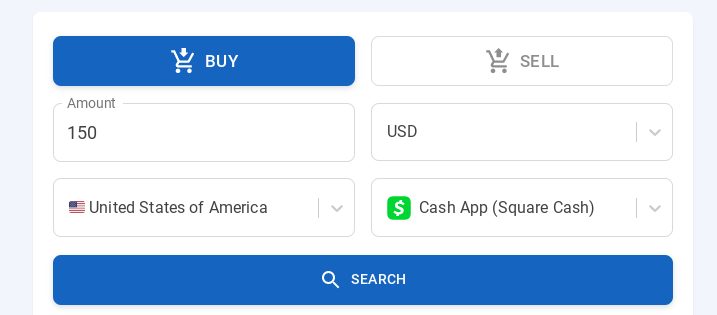
Look for Sellers that do not ask for your ID information

Although the seller will receive a minimal amount of information about your real person depending on the payment method used, always look for sellers who won’t ask you for your passport, driving license, other IDs or a picture with yourself. There is no need to provide this sensitive information to anybody in order to buy Monero.

In this way, at worst a seller may receive your name or email address associated with the payment or small pieces of information about your bank account, or depending on the payment method used, not even that. For the most parts sellers are normal people who buy and sell Monero for profit, and they have no interest in using or selling information they receive from customers.

This is what you will be looking for:
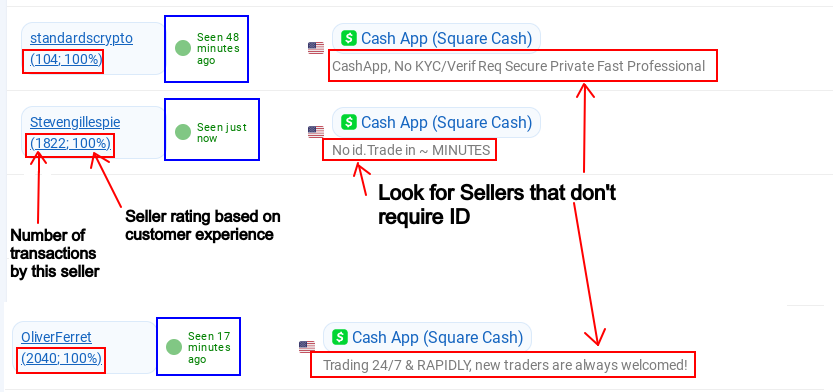
Look for sellers with many transactions and, more importantly, sellers with 100% rating (the 2 numbers under their names), which certifies that the seller is trustworthy and has never attempted to scam anybody. Any customer can leave feedback and notes about a seller, which is a method provided by the platform to prevent scams as a seller’s reputation can be damaged by lower ratings if buyers had negative experiences or have been scammed by certain sellers, which as you can see from the ratings is unlikely in the vast majority of cases.

The times in blue rectangles above is the period since they have last been detected online so ideally you should be looking for people whose time says “Seen just now”, although I noticed sellers who were active despite the time saying that the last they’ve been seen was 15-20-30 minutes ago.

Once you established that a seller is trustworthy and does not ask for ID, you will need to look now on the right hand side of the screen at their Monero offers.

The price in green is the price they are selling one Monero coin for. What you need to be looking for is the lowest numbers as they are the cheapest Monero coins to buy.
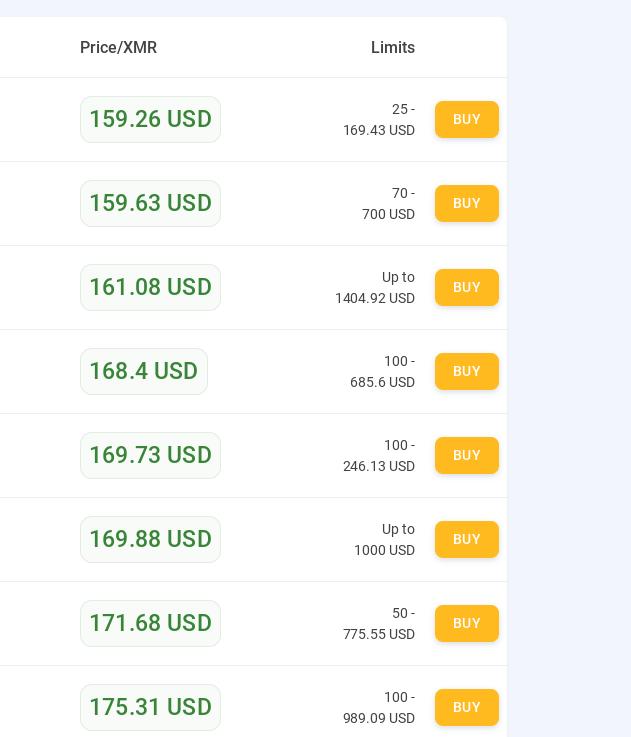
Here ideally you can check the Monero price on the internet by typing in a search engine “Monero to USD” (or your currency) to compare with the price people are selling it on the platform. This will help you figure out how much of the Monero you will keep.
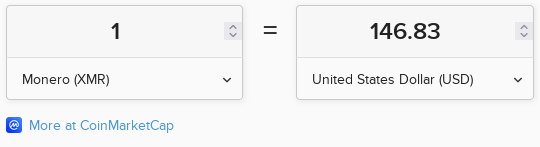
As per CoinMarketCap, the price of 1 Monero currently is 146.83 US Dollars. You need to look for offers on Local Monero that are as close as possible to the Market price, in order to make the most out of the transaction. In the image above $159.26 is the lowest offer so out of the whole list, you will receive the most Monero from that offer.

The price per 1 monero is a guideline, you can buy Monero for any amount you want, which you write at the beginning as shown above. Depending on the amount you want to buy for, the platform will display only the sellers for whom your amount is within their accepted limits. Once you have found the best offer click the yellow button “BUY”.
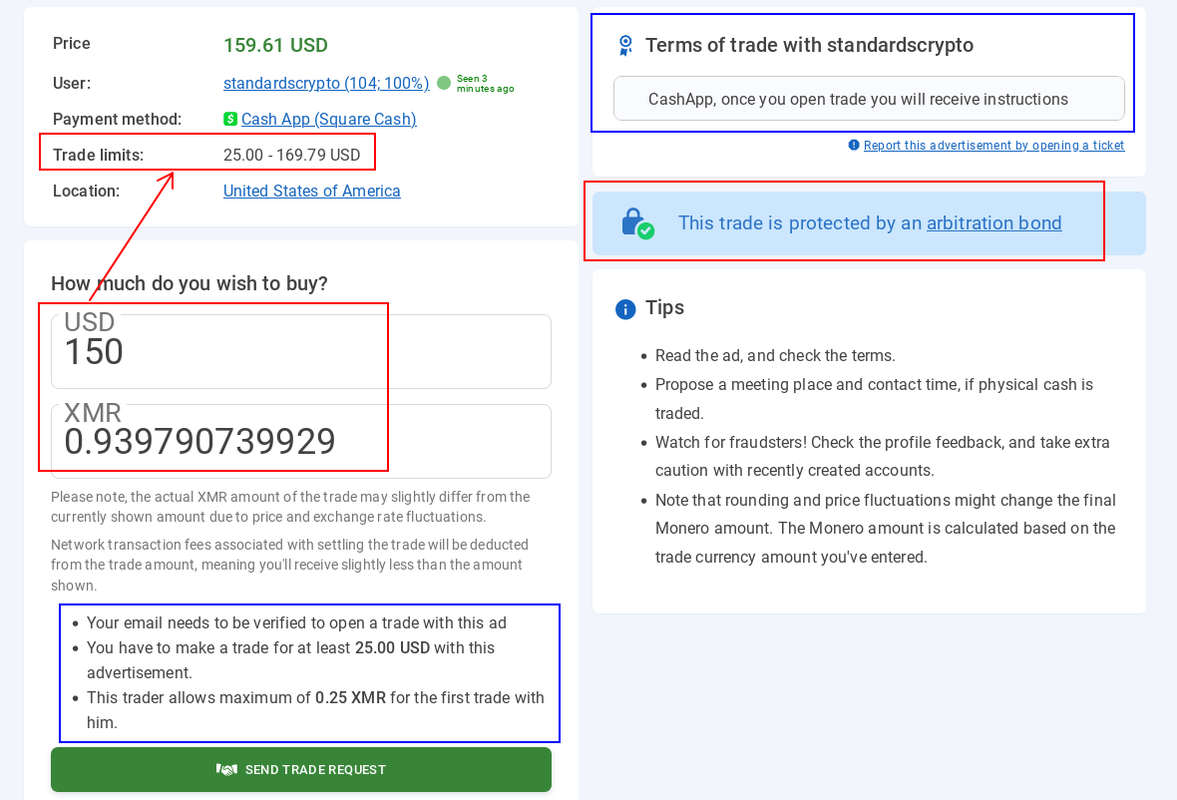
Read the “Terms of trade” from the top-right side of the newly opened page as these are the terms the seller established for transactions with them. That is the place where you will see for sure whether the seller requires any ID. If there is no mention about requiring ID in the whole description then most certainly they won’t ask you for it.

Add the USD amount in the bracket. The seller must receive the exact amount you enter there. If the payment method you use charges a fee for the transfer, you need to add the additional amount to cover the fee. If the seller doesn’t receive the exact amount agreed on, there is a chance they will refuse to release your Monero and you will have to send them the additional amount if they agree to.

Underneath you will see the equivalent amount in Monero. You can copy that amount and paste it in the calculator you opened earlier:
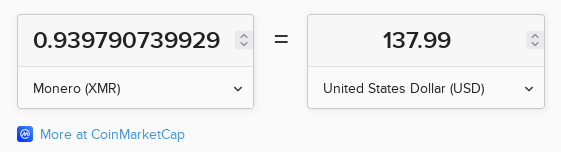
An amount of 0.939 Monero currently equals to 137.99 USD, which means that the whole transaction will cost you 12 USD in fees, which basically cover the seller’s profit and the platform’s fee, which is about normal. The lower the Monero price in the offer, less you will lose on these transactions.

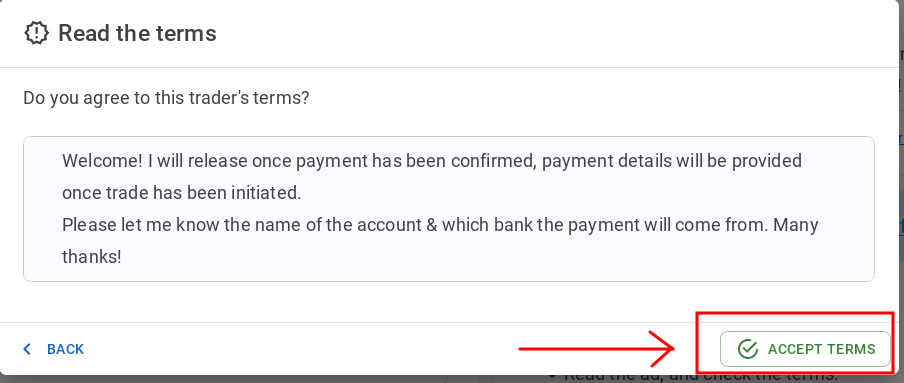
Once you click “Send Trade Request”, a window will open where you will click to agree with the seller’s conditions:
Then you will be directed to add your wallet’s address:
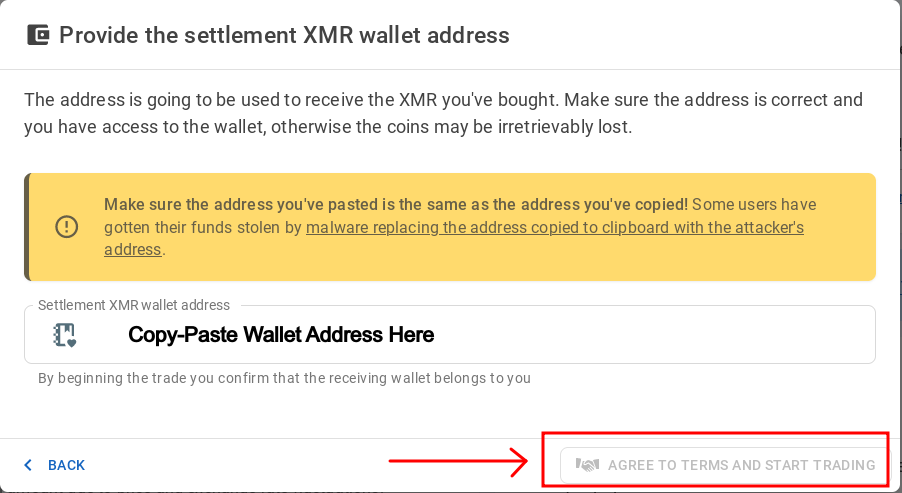
First add your wallet’s address and then press “AGREE TO TERMS AND START TRADING”

On the Exodus wallet, to copy your address you need to press the Wallet Icon, go to the Monero coin and click “Receive”. You will then see your address, which you can copy and paste above:
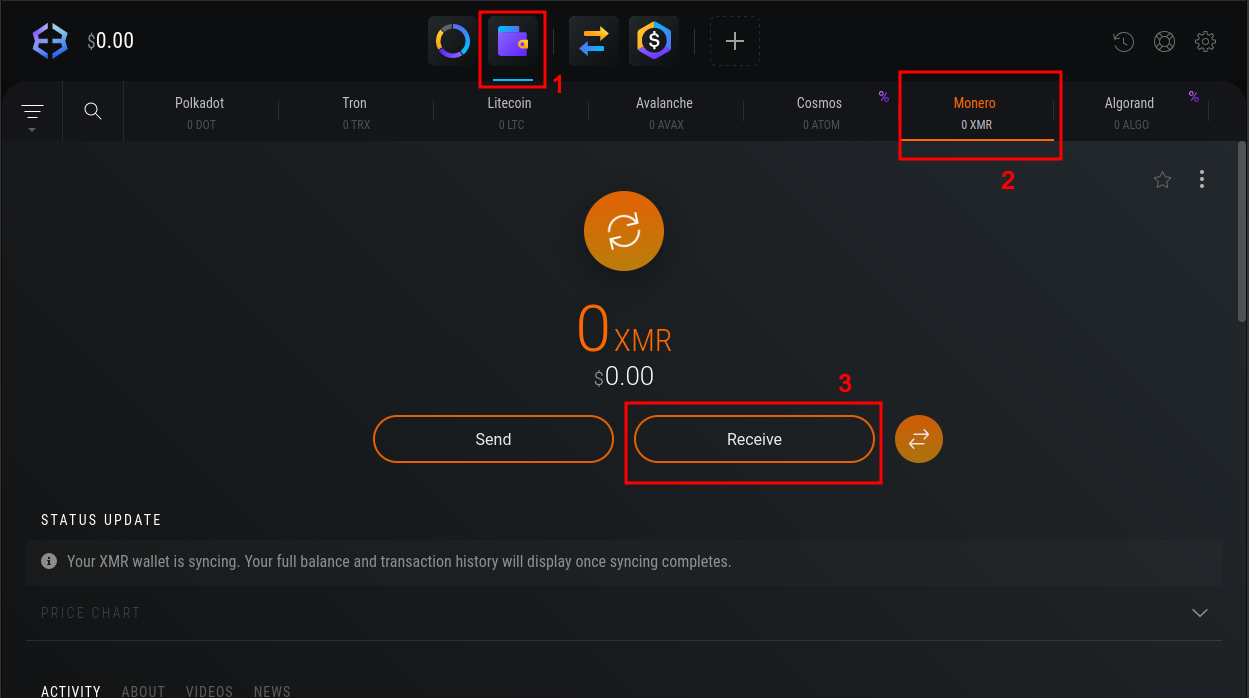
After you copy-paste the address, a new page will open where you will chat with the seller and also see general payment instructions on the right:

The discussion is normally going to be formal and short, something like:

*********************************
Buyer: Hello

Seller: Good morning/evening. Please send payment to:
(Inserts payment details to send the money over)

Buyer: Thanks. They should be sent in a few minutes

Seller: No worries

(Sending payment)

Buyer: Sent it. You should get them in seconds.

Seller: Received them. Thanks for the transaction.
*********************************
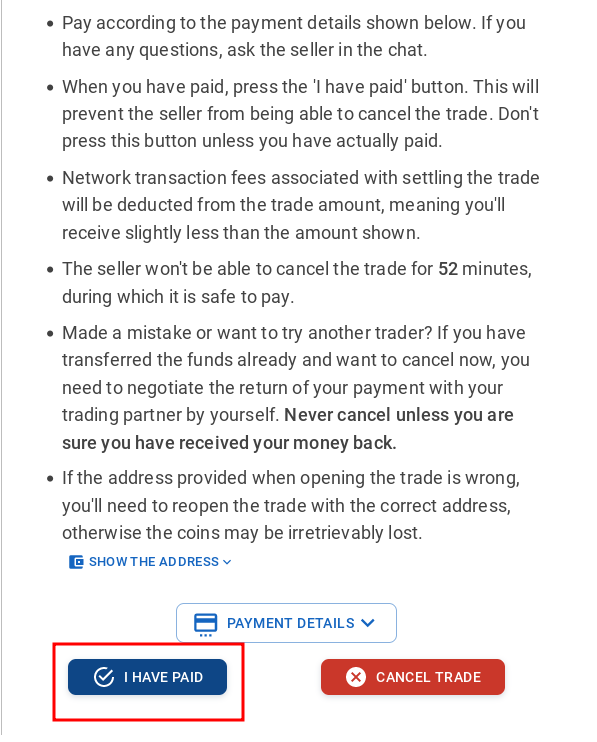
Once you have sent the money to the seller’s provided account, click “I HAVE PAID

When the payment is finalized, the seller will release the Monero and the above should pop up. It takes around 30 minutes for the Monero to reach your wallet.

If for any reasons the seller refuses to send the Monero (although highly unlikely) or you have any other issues with the seller, most transactions are protected by the platform and you can dispute the transaction live, in the same page where you chat with the seller:
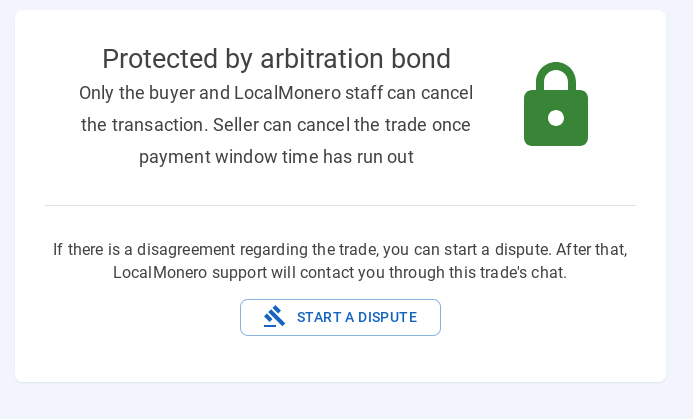
This is extremely unlikely. Transactions will go smooth for the most part as long as you send exactly the agreed amount. Scams are extremely rare in such platforms.

When the payment is finalized, this message will appear in the chat page:
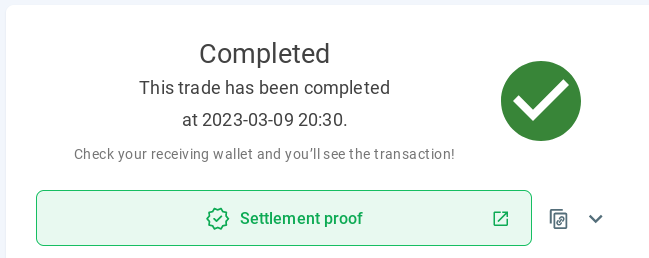
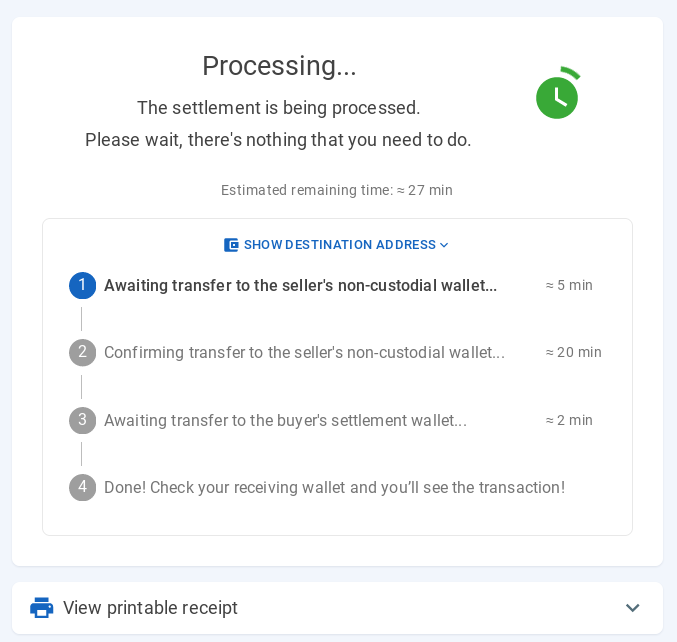
However you don’t need to wait 30 minutes on the page for this message. What you need to see is the “Processing” status where the seller released the Monero and are in the process of entering your wallet. You can close the page and log off once you see that, or you can wait if you desire to.

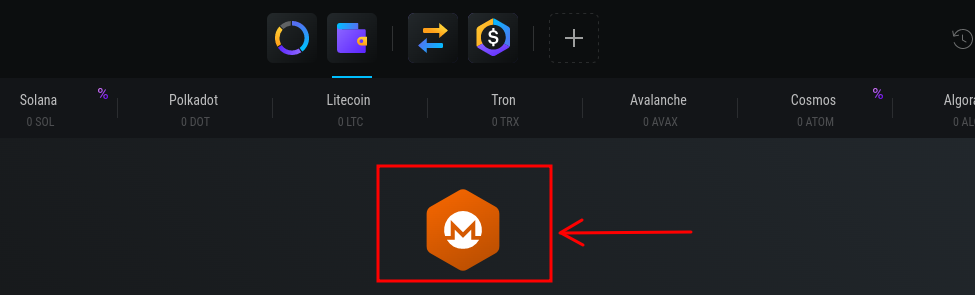
Before you can use Monero after they enter your wallet, you may need to update it with the latest Monero blockchain transactions. This is a privacy feature on Monero, which downloads the latest blockchain transactions (from the moment you do the first Monero transaction) on your computer. If it doesn’t start automatically, you can press the Monero coin button on your wallet and then press “Rescan”:
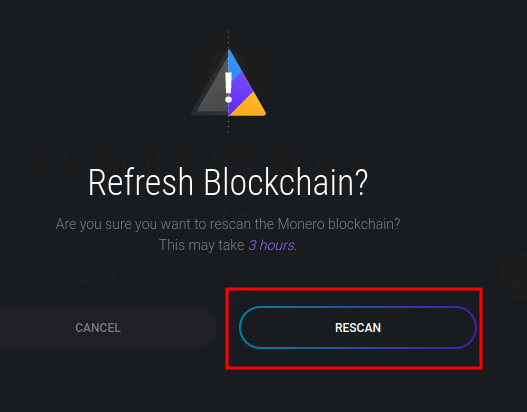
That’s all about it. Once the wallet is synced with the blockchain, you can use the monero for donations or buying a VPN or any other things that allow crypto-currency payments in Monero.

You can donate to JoS anonymously in this way as there is no ID required to set up any of the wallet or Local Monero account. Also the only thing that appears in your bank transaction list and bank statement is a transaction from you to the Monero seller which will have a normal random name or a random business name and there will be no mention of any crypto-currencies in the money transaction from you to them.

Basically your payment to the seller and the seller releasing the Monero to your wallet are two separate transactions, unrelated to each other in the sense that only the seller can link them together, and he cannot cause any harm to you as the seller will never ask and has no way to know what you will do with the Monero.

If needed you can also exchange Monero with any other coin that is supported by Exodus for a fee that depends on the amount to be exchanged. Not many services accept Monero so in the future you might come across situations where you will have to exchange Monero to other currencies. That or you might be able to find a platform where you can buy Bitcoin or other crypto-currencies in the same way you can buy Monero from LocalMonero.

The major advantage of buying Monero from a separate platform is that your Exodus wallet is therefore not linked back to your bank account or Paypall account or the method used. The seller may keep the transactions details for a few months but as far as they are concerned, we are just any other customers, random people that they trade with on a daily basis.

As a final note: these are two examples of sellers’ terms of trade that you need to avoid when looking for offers.
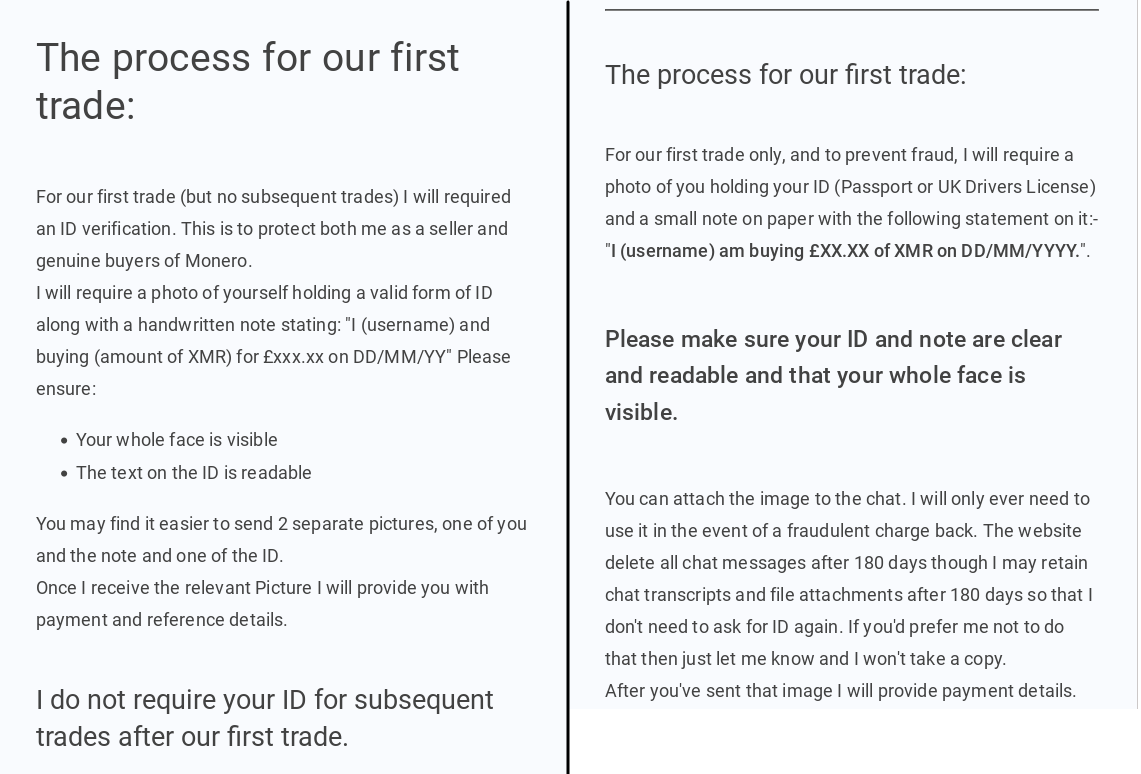
Is not necessarily dangerous to give out your ID this way but if is possible, then is definitely more safe to avoid these sellers. A general rule of thumb is that offers that don’t require ID are in most cases more expensive than the offers that do require a form of photographic ID. Personally I preferred to pay $10-20 more than giving out highly sensitive ID like passport or driving license or face photo.

If a trader doesn’t mention ID in the trade but they ask you for ID in the chat, simply tell them that there is no mention of ID required in the transaction description and that you are not giving ID away. If they don’t accept then you can cancel the trade with the seller and look for another trade.

For any Inquiries on Translations matters please message me on the Forums or Vultus Templorum or email me at [email protected]

#40

In case anyone hasn't heard it yet, Exodus is cutting support for Monero in August. Make sure to transfer to a new wallet before that!
https://www.exodus.com/support/en/articles/10862085-what-should-i-do-with-my-monero-xmr-before-support-ends

I recommend Cake Wallet.

Bitvalve still works for buying crypto p2p, I recommend swapping from bitcoin to xmr through FixedFloat

#41

Hey there, I just made an attempt from my phone. Moonpay and my bank wont allow 1000, or even 500. What a pain. Got all my IDs and face and all too, figured I'd just give it a good go. Social number was in there too. I know it needs to be done and I made a good run of it. I will keep trying, hope I can get it to work with my bank. I remember years ago, only up to 50 bucks per go was allowed, which is why I walked away from it for some time. I came back to this, but just in time for monero to be getting kicked. What timing hm.. Just a pain that even the crappy non anonymous way is giving trouble too. I even tried the paypal option and they also rejected the attempt. While taking all my identification too.

#42

Called my bank, went through all the fraud protection stuff. Apparently it should work by the end of the day, now that Moonpay has, I would guess, recollected my information and maybe a cooldown period can set in for the card. Please excuse my frustration, but, if this does not work, I will try ramp and some other platforms as has been suggested. I'll keep sharing my experiences. Thank you for the help, again, I will try the anonymous methods later, though, even those would still require a bank card of sorts, even providing IDs and facial recognition. Either way, as I was back 3 years ago, I am here, I am donating to the well being of humanitys future, I am here donating to help the promotion of the Truth and the next Golden Age of Humanity. I am here regardless of all the odds that were stacked against me before and after I dedicated, and to realize the Gods have been here for me, for us, all this time. I am blessed in just knowing that at least, and I am blessed I am able to share this time with all us Brothers and Sisters in Satya. I am willing to tear down my own fears to where they are none but under foot, and any other obstacles that keep myself and others from moving forward.

I do apologize for the complications, and I have sent ALOT of messages to the Priesthood through the donation email and main email. I have just wanted to communicate my status clearly, without being as annoying as possible. I kind of feel like I failed there, but, here I am.

I will let you know, and thankfully, my bank seems to approve of these transactions frequently, so moving forward, maybe with another crypto provider, I may have more success. It does make me feel a bit like a caveman in comparison to it being everyday life for others, but I will come around in time I think. I read the HPs latest post about AI and the term of "others may look at others who do not understand how to use this as ancient," well, effect felt lol, but that is my fault for not diving in earlier. I had alot going on in life earlier, alot that was my own fault, and stability has been my goal for awhile, thinking about crypto just seemed like moving away from that goal at the time.

Thanks again, hopefully I report successful ongoing donations from this post onward.

#43

In case anyone hasn't heard it yet, Exodus is cutting support for Monero in August. Make sure to transfer to a new wallet before that!
https://www.exodus.com/support/en/articles/10862085-what-should-i-do-with-my-monero-xmr-before-support-ends

I recommend Cake Wallet.

Bitvalve still works for buying crypto p2p, I recommend swapping from bitcoin to xmr through FixedFloat

Yeah that was a real disappointment, especially after reading XMR was the preferred currency over the pre-existing bitcoin. Good news though, pending transaction through paypal. Likely going to wait for that to go through, will check between this week and next week and give confirmation. I will look at fixed float for changing the currency. Excited if this works so I can get what I have wanted to done.

Temple Guardian The Alchemist, thanks again for your patience. I'd recommend your method to anyone who is able to go get the private hardware with the inclusion of a private phone number and the de-googling method for the pixel phone series. I did not want to take away from your method, though I gave it a good shot with what I had in regards to my situation and eventually figured it would be better to just step forward and do what I must. I sacrificed a gift card to try to buy a private number too on earlier attempts and that was no good :( haha. As far as any discontent, it is purely because of the situation and my own odds with the situation, and it came that I might have learned a bit more about myself through this that I needed to learn anyhow :) . I think my current life situation has left me a little starved for contact with others as well, and, well I guess some of it does seem to come out here where I am beginning to feel at home again, or maybe, looking back through previous experiences, truly for the first time.

I want to make that clear for anyone reading, their guide is very valuable, and you should use it if you can. All of this, and reading AFODO's cybersecurity guide has shown me where I have been behind and need to catch up.

Thank you again everyone

Hail Satya
Hail Zeus

#44
This is the targeted message.

Called my bank, went through all the fraud protection stuff. Apparently it should work by the end of the day, now that Moonpay has, I would guess, recollected my information and maybe a cooldown period can set in for the card. Please excuse my frustration, but, if this does not work, I will try ramp and some other platforms as has been suggested. I'll keep sharing my experiences. Thank you for the help, again, I will try the anonymous methods later, though, even those would still require a bank card of sorts, even providing IDs and facial recognition. Either way, as I was back 3 years ago, I am here, I am donating to the well being of humanitys future, I am here donating to help the promotion of the Truth and the next Golden Age of Humanity. I am here regardless of all the odds that were stacked against me before and after I dedicated, and to realize the Gods have been here for me, for us, all this time. I am blessed in just knowing that at least, and I am blessed I am able to share this time with all us Brothers and Sisters in Satya. I am willing to tear down my own fears to where they are none but under foot, and any other obstacles that keep myself and others from moving forward.

I do apologize for the complications, and I have sent ALOT of messages to the Priesthood through the donation email and main email. I have just wanted to communicate my status clearly, without being as annoying as possible. I kind of feel like I failed there, but, here I am.

I will let you know, and thankfully, my bank seems to approve of these transactions frequently, so moving forward, maybe with another crypto provider, I may have more success. It does make me feel a bit like a caveman in comparison to it being everyday life for others, but I will come around in time I think. I read the HPs latest post about AI and the term of "others may look at others who do not understand how to use this as ancient," well, effect felt lol, but that is my fault for not diving in earlier. I had alot going on in life earlier, alot that was my own fault, and stability has been my goal for awhile, thinking about crypto just seemed like moving away from that goal at the time.

Hello. You don't even need to call the bank though unless they block your payments. However a bank transfer is rarely the case when buying crypto, in most cases there is a third party service involved like Cash App in US that you send the money through which I would argue is a lot better than direct bank transfer to the seller because the bank is a lot less likely to block the transaction. You will also use references such as "friend", "family" etc. so they cannot even see that it's a transaction related to crypto-currencies. You will need to real real identity and card when register on the third party platform but even they won't know that you are buying crypto if you don't reference it in the transaction.

To summarize the whole process generally by steps:
1. Install Exodus wallet or another wallet that you are comfortable with, don't use your real ID information

2. Use a peer-to-peer platform such as Bitvalve to buy crypto-currency (there are a few supported in ToZ that are traded on Bitvalve, you don't have to buy Monero necessarily). Register on this platform with random username and a spare email, not your personal email or emails linked to you, or using your real name

3. Find sellers that don't require ID verification. The way this can be verified is pretty much the same as I described in the original guide. Look for sellers that either explicitly mention no ID verification, or they don't mention it at all. Make sure to also chose the ones with the best offers, ideally over 0.9 in cryptocurrency for every 1 USD you give (as an example),

4. See what payment method they prefer. Is there is a method that seem popular across many sellers you can register on it and use only that one. This is the only place where you will need to use real ID information although this is only an intermediary between your bank and the seller). You could also do bank transfer directly to the seller if you both are from the same country, this is fine as well as long as you don't mention about crypto in the transaction, but the condition is for the bank to not be constantly blocking your transactions or you having to get in touch with them repeatedly, in this case is better to use a third party service to send the money through.

I also noticed after you do your first transaction Bitvalve will ask to "verify" it by confirming your date of birth and country of residence, you can use random information here and will still work. HP Zevios Metathronos also suggested me another platform that I will give a try this month and see how it is.

For any Inquiries on Translations matters please message me on the Forums or Vultus Templorum or email me at [email protected]

#45

Hello. You don't even need to call the bank though unless they block your payments. However a bank transfer is rarely the case when buying crypto, in most cases there is a third party service involved like Cash App in US that you send the money through which I would argue is a lot better than direct bank transfer to the seller because the bank is a lot less likely to block the transaction. You will also use references such as "friend", "family" etc. so they cannot even see that it's a transaction related to crypto-currencies. You will need to real real identity and card when register on the third party platform but even they won't know that you are buying crypto if you don't reference it in the transaction.

To summarize the whole process generally by steps:
1. Install Exodus wallet or another wallet that you are comfortable with, don't use your real ID information

2. Use a peer-to-peer platform such as Bitvalve to buy crypto-currency (there are a few supported in ToZ that are traded on Bitvalve, you don't have to buy Monero necessarily). Register on this platform with random username and a spare email, not your personal email or emails linked to you, or using your real name

Thank you for the response, my concern here with what you mentioned takes us back earlier in this thread though. Bitvalve requires some kind of gmail or google related account, which in my case at least, requires some kind of phone number, I cant seem to get past that verification there. I think I have looked through AFODOs works to find the answer, but, will a VPN effect (positively) my ability to use free phone numbers for account confirmation? My experience on Bitvalve did not allow me to successfully create an account with my proton mail email, or even my alternate proton email I used for that express purpose. Maybe it is an issue particularly having to do with being in America, but I am not sure, others seem to be able to use the temporary numbers readily from countries other than my own. Likely I will complete my base donations with what I can do now and continue to try the methods you have given me when I have access to another phone and ultimately, the phone number that I'll purchase for it. The privacy would be nice for future ability to donate, and I will remember Cashapp and Fixedfloat for their given purposes. Cakewallet too, though, anything is new to me in regards to this.

I have to get going for tonight, but I am learning and I do appreciate the patience, despite it being a bit on the baby steps side of things for me. I think from here, with the referenced apps it will give me some new things to research and experiment with. Which I'll also share experiences with as well.

Have a nice day, thanks for bearing with me. Hopefully these transactions go through smoothly and I can move forward with this with little to no issues. Hopefully this adds some good context for others to trying to reason with all of this too. Will update as time goes on, including experiencing the other recommended apps.

#46

Thank you for the response, my concern here with what you mentioned takes us back earlier in this thread though. Bitvalve requires some kind of gmail or google related account, which in my case at least, requires some kind of phone number, I cant seem to get past that verification there. I think I have looked through AFODOs works to find the answer, but, will a VPN effect (positively) my ability to use free phone numbers for account confirmation? My experience on Bitvalve did not allow me to successfully create an account with my proton mail email, or even my alternate proton email I used for that express purpose. Maybe it is an issue particularly having to do with being in America, but I am not sure, others seem to be able to use the temporary numbers readily from countries other than my own. Likely I will complete my base donations with what I can do now and continue to try the methods you have given me when I have access to another phone and ultimately, the phone number that I'll purchase for it. The privacy would be nice for future ability to donate, and I will remember Cashapp and Fixedfloat for their given purposes. Cakewallet too, though, anything is new to me in regards to this.

I have to get going for tonight, but I am learning and I do appreciate the patience, despite it being a bit on the baby steps side of things for me. I think from here, with the referenced apps it will give me some new things to research and experiment with. Which I'll also share experiences with as well.

Have a nice day, thanks for bearing with me. Hopefully these transactions go through smoothly and I can move forward with this with little to no issues. Hopefully this adds some good context for others to trying to reason with all of this too. Will update as time goes on, including experiencing the other recommended apps.

Hello. I found that the phone verification is only one-off at the beginning to get the account going. After that when you login you will verify only with the email.

If you type "receive sms verification online" you will find several platforms that contain phone numbers that you can use on Bitvalve to receive that one, which will only be needed once. You will most likely need to try several numbers as many may not work.

You definitely don't need a google account or email. You can register on Proton mail for a free email address and use that to register.

For any Inquiries on Translations matters please message me on the Forums or Vultus Templorum or email me at [email protected]

#47

Hello. I found that the phone verification is only one-off at the beginning to get the account going. After that when you login you will verify only with the email.

If you type "receive sms verification online" you will find several platforms that contain phone numbers that you can use on Bitvalve to receive that one, which will only be needed once. You will most likely need to try several numbers as many may not work.

You definitely don't need a google account or email. You can register on Proton mail for a free email address and use that to register.

I wish what you were saying worked for me, but it kept asking for phone numbers of which, the free sms verification sites provided only the response "this number has been used too many times" from google/youtube. I gave up after trying a very large amount of them some month ago, understanding it was something I would really only be able to accomplish be getting a new sim card and preferably using that de-googled phone method. I really would love that for my own phone, maybe I look into purchasing 2 when I am able to seize that chance.

Good news though Brother, my transaction, first one, is going through, and I will be making my first proper donation in a few moments. :) Hopefully no more bank calls, though, that went off without too many issues.

A good start at the least. I will still be trying your methods as soon as I am able. The successful purchase was made through moonpay, though, a bank call was necessary to clear the way through the fraud department. Not on the most anonymous side, but, I am happy I got it to finally work. Again, I have to be clear, this responsibility is on me for this, no one else. Even if it was in the style of smacking the old tv until it worked, or at least I kind of perceive it that way haha. ☺️

Good fortune to the workings in the next 5 days, I will be there with everyone as well.

HAIL SATYA
HAIL ZEUS

#48

Hello. I found that the phone verification is only one-off at the beginning to get the account going. After that when you login you will verify only with the email.

If you type "receive sms verification online" you will find several platforms that contain phone numbers that you can use on Bitvalve to receive that one, which will only be needed once. You will most likely need to try several numbers as many may not work.

You definitely don't need a google account or email. You can register on Proton mail for a free email address and use that to register.

Successful and proper donation using moonpay/exodus wallet complete. :) Will update on further experiences.

Thank you again for your patience.

#49

is it safe to donate toz in usa via centralized exchanges?

#50

is it safe to donate toz in usa via centralized exchanges?

If you want total control, anonymity, decentralization, and don't mind the technical process then a DEX is the way to go

#51
HadesWithin666said:post: 1149221

If you want total control, anonymity, decentralization, and don't mind the technical process then a DEX is the way to go

and yet this does not answer my question

#53

Greetings SG The Alchemist7, do you have an updated version of this by chance? Monero is no longer being traded on the website you linked. This one right here, www.localmonero.co I am trying to get around my bank, since they do not allow direct crypto purchases and was wondering if you had any other options that might work for me or others. Be blessed Brother.

HAIL ZEUS, THE CLERGY and the GODS!!
Seek challenges, they bring growth.
Stay the path, your consistency will pay off.
Continue to be optimistic.
negativity is a tool, not a reactionary system inside us.
You cannot help others if you do not understand the self first.

The challenge, the suffering, shows you what you are capable of in life. If one isn't tested into action, then it only remains as potentiality.