Header Wallpaper

Anonymous Monero Purchasing Guide For JoS Donations And/OrPersonal Use

AvatarThe Alchemist7 [SG]13 min to read

Download Guide in PDF for offline read here:
https://mega.nz/file/JFRTnZ7Y#_4rnPLenF6oufeye7lbGq-Mi-fZvprIKDQs7jKPtyzk

Do not hesitate to ask any questions you might have. It might seem long but is very easy to follow and apply. Once you do 1-2 transactions you will get used to it straight away.

____________________________________

The following Guide provides simple instructions on how to buy the Monero crypto-currency via a method that is nearly impossible to trace back to one’s real identity, and is mostly addressed to members who want to donate to JoS but are not familiar with buying crypto-currencies or using crypto wallets.

The first step is to obtain any wallet from where you can receive and send crypto-currency transactions. Any wallet can be used for this purpose so if you already have one or consider a different wallet, you can skip the following guides for setting up a crypto wallet.

The wallet I’ve been using and I found the easiest to deal with is the Exodus wallet, which should be downloaded only from their official platform (it does not require your real identity or bank details):
https://www.exodus.com/

Open the link and on the top-right corner you should see the Download button:
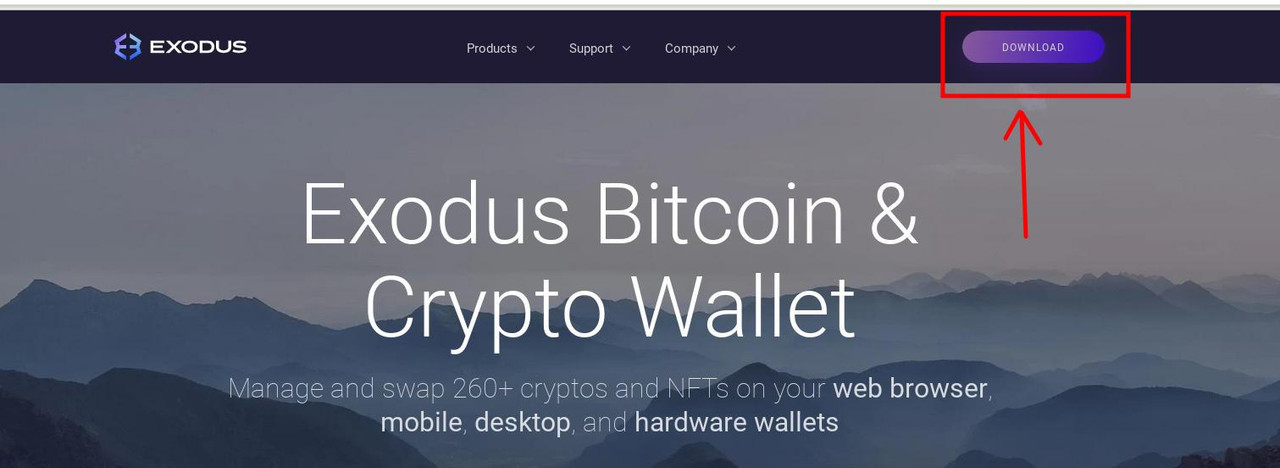
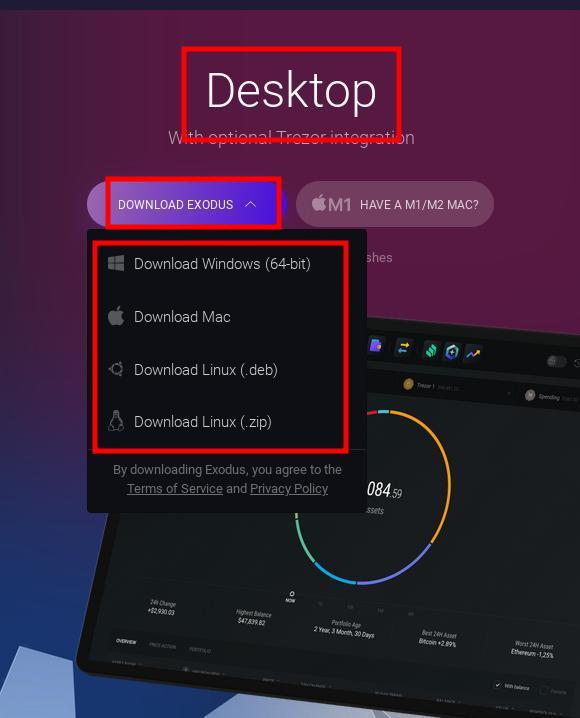
Press the Download option and look for the Desktop app versions (which will likely be on the right-hand side of the newly opened page), press the drop-down “Download Exodus” option and download the correct version for your Operating System:
To install the wallet you can follow this very simple 5 minutes Youtube video which shows everything you need to know to set up the Exodus wallet (for certain Linux Operating Systems, the installation process is mostly the same as for Windows):

How to Install Exodus Wallet Step by Step (2021) | Exodus Wallet Crypto Coins
https://www.youtube.com/watch?v=0a3Bo0eUUvk

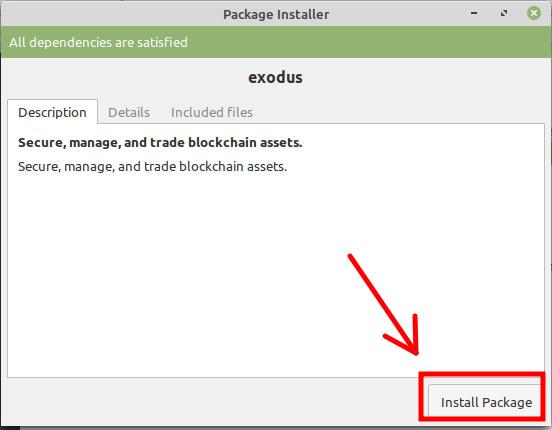
For some Linux distributions you will open the .deb file and press “Install Package

A mention that I have to make here is that you should be extremely cautious when saving your password and 12 words secret phrase. This will allow you to recover your wallet in case of irreparable computer damage or obtaining a new computer. Since is going to be very difficult to impossible to memorize the password and the 12 words secret phrase for long time, there are 2 things you can do:

- Write them in a document or simple text file and save it on a USB stick or a storage device that does not have access to internet;

- Write them on a physical piece of paper and hide the paper in a place that only you know about, and also where its integrity can be preserved so it doesn’t get damaged in time;

How To buy Monero

Create an account on the platform
www.localmonero.co
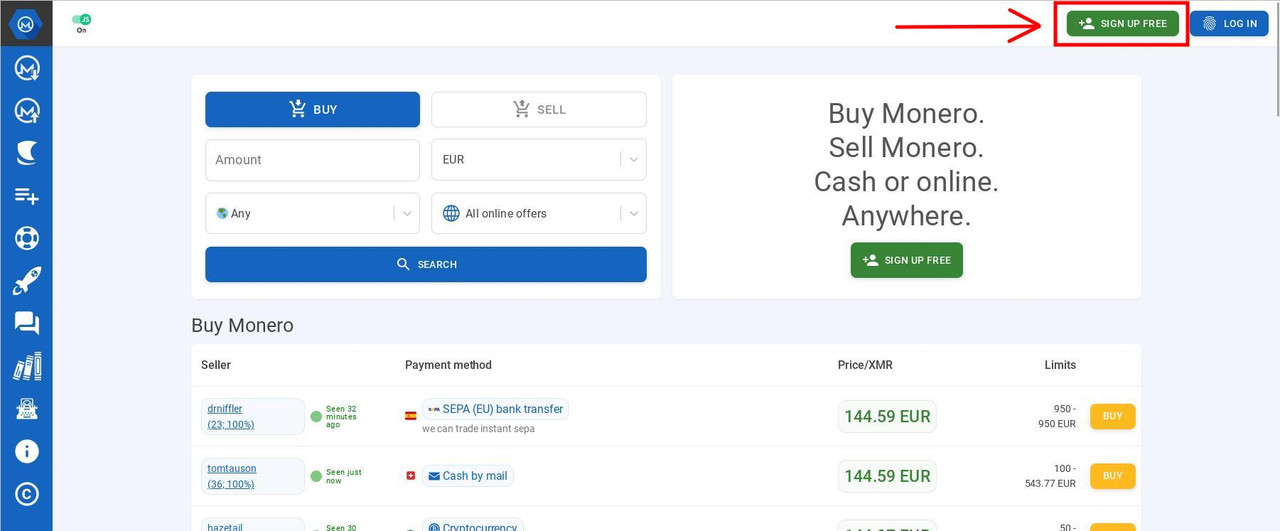
Fill in an Username and Password which you must keep safely, ideally together with the Exodus Password and Secret 12 Words Phrase (or the details of your other wallet if so).
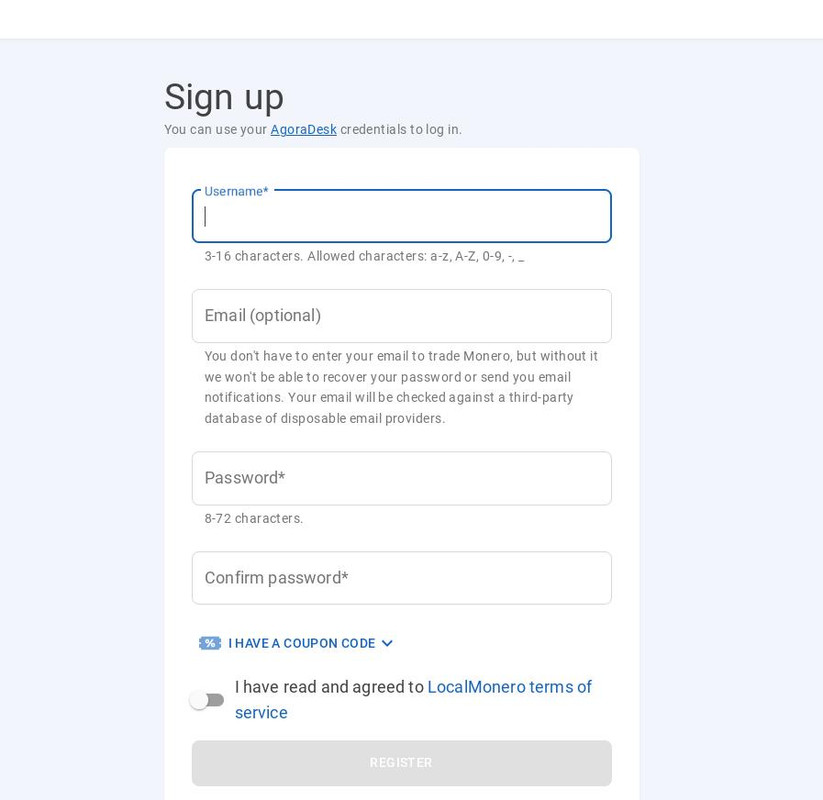
You don’t need to use an email mandatorily, however validating an email address will allow you access to sellers who only accept customers with verified email. If you decide to use an email, do not use your real life email address. Instead, use the address that you use on our forums or create an anonymous email address on protonmail or another platform, except of email platforms that provide disposable email addresses as you will need a stable email.

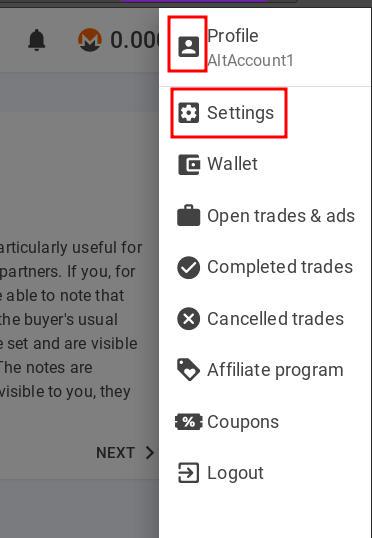
For registering you can skip adding an email and if you need to, can add it any time afterwards by going to the top-right corner of the platform and clicking the account option and then click Settings:
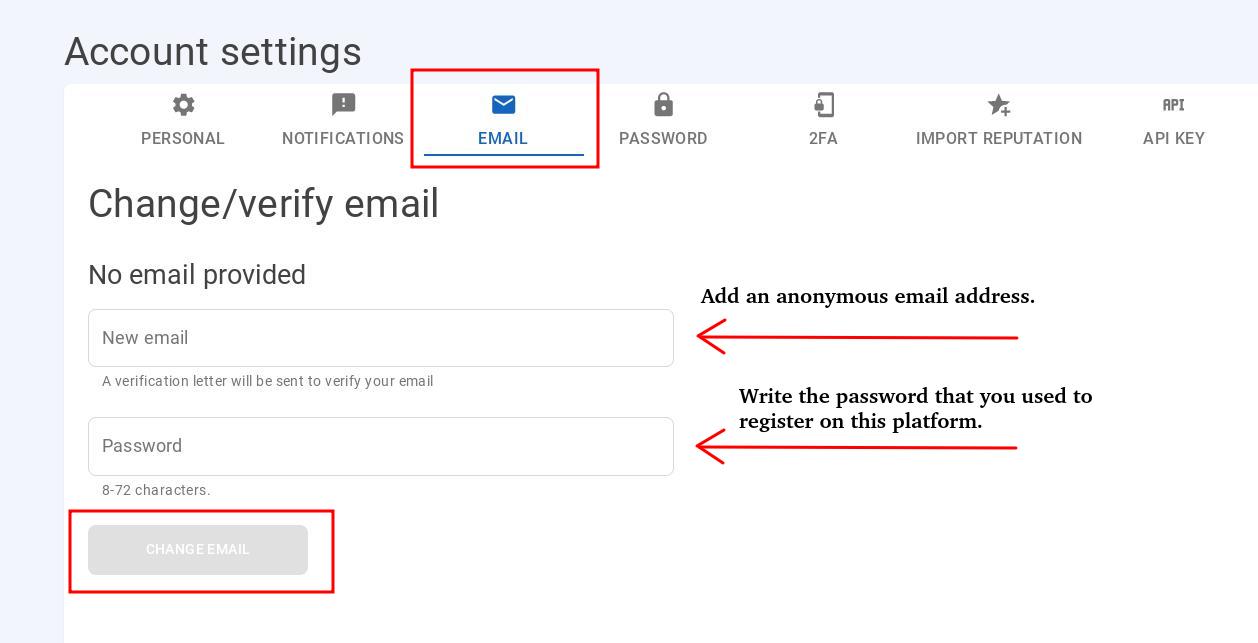
Then go to Email, fill in the email that you want to add, the password that you used to register on Local Monero and click “Change Email”. The platform will likely send a confirmation link to your email inbox, which you will need to click in order for your email to be verified.
That’s It – You are now ready to buy Monero

Once your account is set up, you can go to the homepage and fill in country you are buying from, the currency, amount and payment method and then click SEARCH.
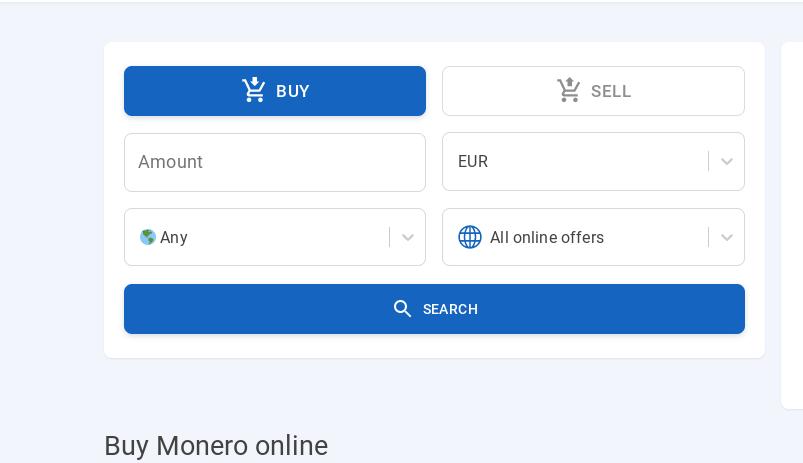
There is a wide range of payment methods accepted, the most popular being Direct Bank Transfer, Paypall, Cash by Email, Transferwise etc.

For example purposes we will fill in the details to buy $150 worth of Monero from United States using the CashApp method (a popular application used to send money from your bank account to other people in US and UK).
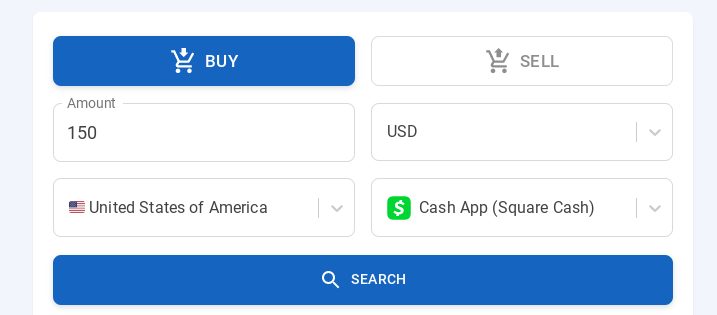
Look for Sellers that do not ask for your ID information

Although the seller will receive a minimal amount of information about your real person depending on the payment method used, always look for sellers who won’t ask you for your passport, driving license, other IDs or a picture with yourself. There is no need to provide this sensitive information to anybody in order to buy Monero.

In this way, at worst a seller may receive your name or email address associated with the payment or small pieces of information about your bank account, or depending on the payment method used, not even that. For the most parts sellers are normal people who buy and sell Monero for profit, and they have no interest in using or selling information they receive from customers.

This is what you will be looking for:
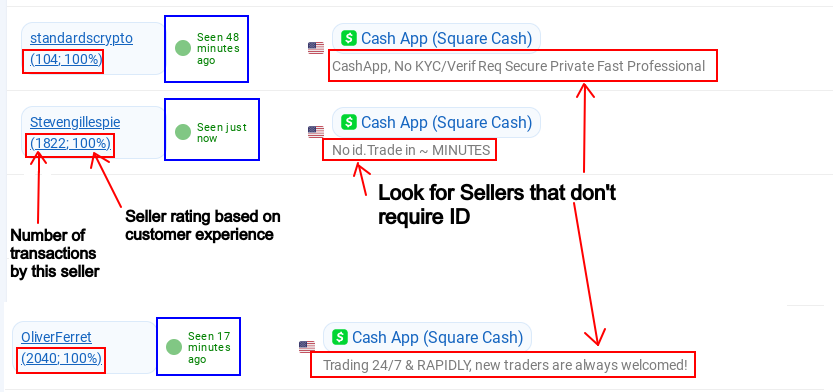
Look for sellers with many transactions and, more importantly, sellers with 100% rating (the 2 numbers under their names), which certifies that the seller is trustworthy and has never attempted to scam anybody. Any customer can leave feedback and notes about a seller, which is a method provided by the platform to prevent scams as a seller’s reputation can be damaged by lower ratings if buyers had negative experiences or have been scammed by certain sellers, which as you can see from the ratings is unlikely in the vast majority of cases.

The times in blue rectangles above is the period since they have last been detected online so ideally you should be looking for people whose time says “Seen just now”, although I noticed sellers who were active despite the time saying that the last they’ve been seen was 15-20-30 minutes ago.

Once you established that a seller is trustworthy and does not ask for ID, you will need to look now on the right hand side of the screen at their Monero offers.

The price in green is the price they are selling one Monero coin for. What you need to be looking for is the lowest numbers as they are the cheapest Monero coins to buy.
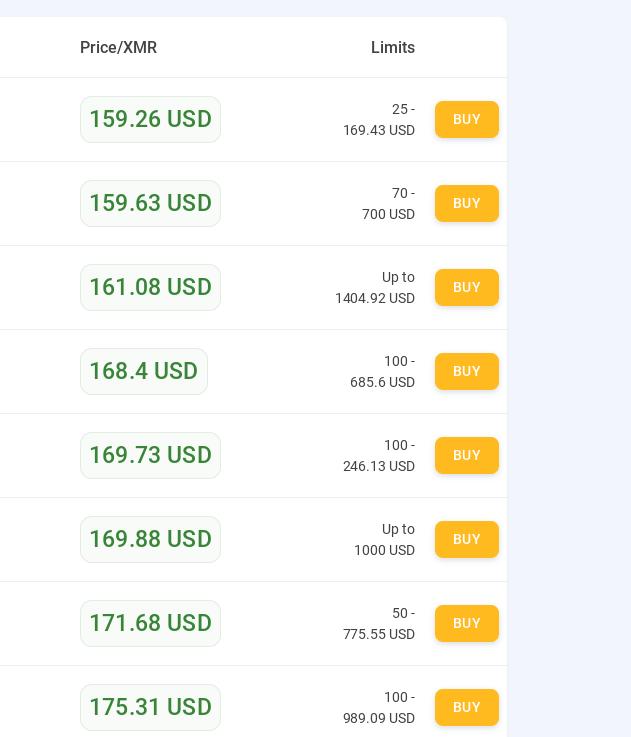
Here ideally you can check the Monero price on the internet by typing in a search engine “Monero to USD” (or your currency) to compare with the price people are selling it on the platform. This will help you figure out how much of the Monero you will keep.
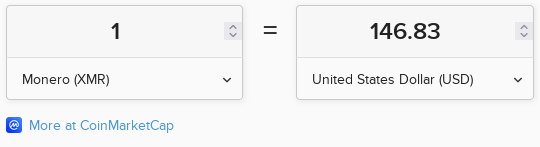
As per CoinMarketCap, the price of 1 Monero currently is 146.83 US Dollars. You need to look for offers on Local Monero that are as close as possible to the Market price, in order to make the most out of the transaction. In the image above $159.26 is the lowest offer so out of the whole list, you will receive the most Monero from that offer.

The price per 1 monero is a guideline, you can buy Monero for any amount you want, which you write at the beginning as shown above. Depending on the amount you want to buy for, the platform will display only the sellers for whom your amount is within their accepted limits. Once you have found the best offer click the yellow button “BUY”.
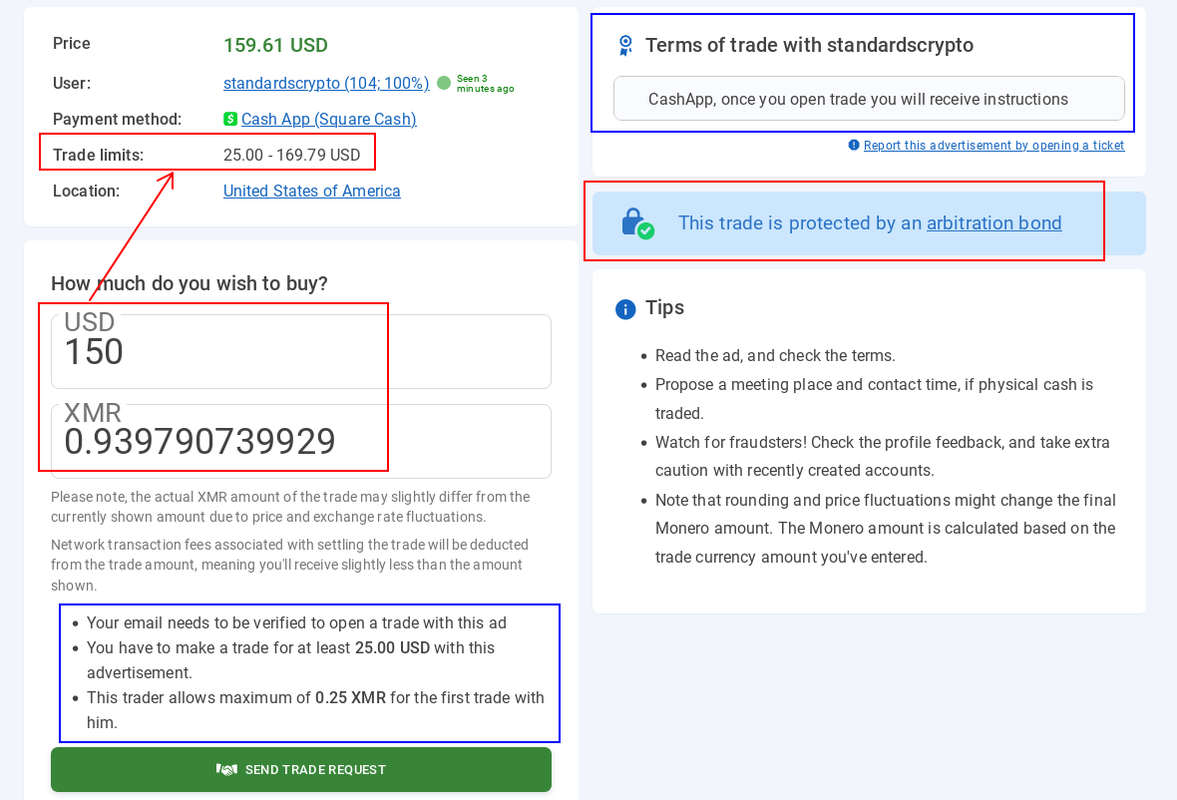
Read the “Terms of trade” from the top-right side of the newly opened page as these are the terms the seller established for transactions with them. That is the place where you will see for sure whether the seller requires any ID. If there is no mention about requiring ID in the whole description then most certainly they won’t ask you for it.

Add the USD amount in the bracket. The seller must receive the exact amount you enter there. If the payment method you use charges a fee for the transfer, you need to add the additional amount to cover the fee. If the seller doesn’t receive the exact amount agreed on, there is a chance they will refuse to release your Monero and you will have to send them the additional amount if they agree to.

Underneath you will see the equivalent amount in Monero. You can copy that amount and paste it in the calculator you opened earlier:
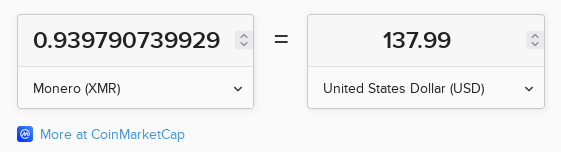
An amount of 0.939 Monero currently equals to 137.99 USD, which means that the whole transaction will cost you 12 USD in fees, which basically cover the seller’s profit and the platform’s fee, which is about normal. The lower the Monero price in the offer, less you will lose on these transactions.

Once you click “Send Trade Request”, a window will open where you will click to agree with the seller’s conditions:
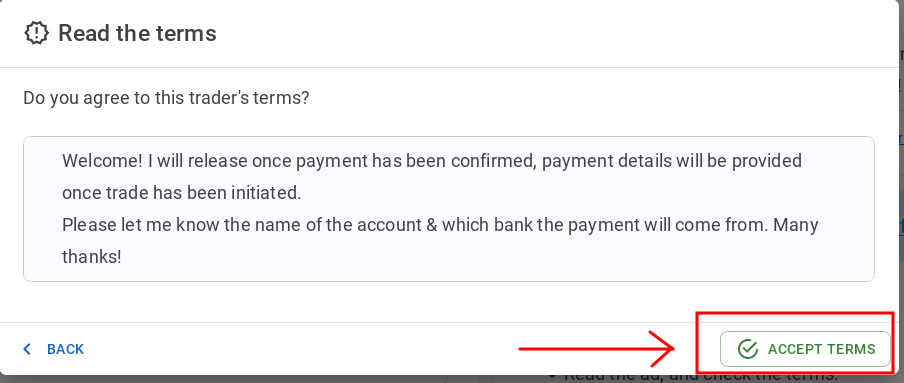
Then you will be directed to add your wallet’s address:
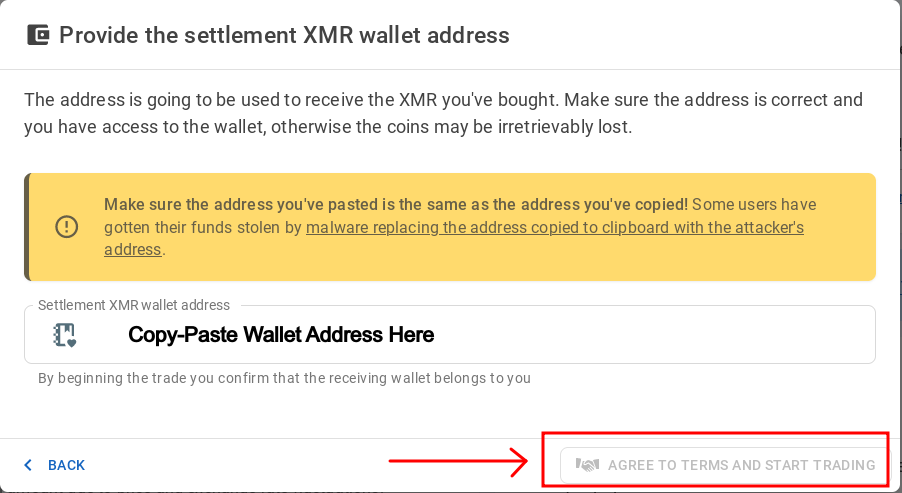
First add your wallet’s address and then press “AGREE TO TERMS AND START TRADING”

On the Exodus wallet, to copy your address you need to press the Wallet Icon, go to the Monero coin and click “Receive”. You will then see your address, which you can copy and paste above:
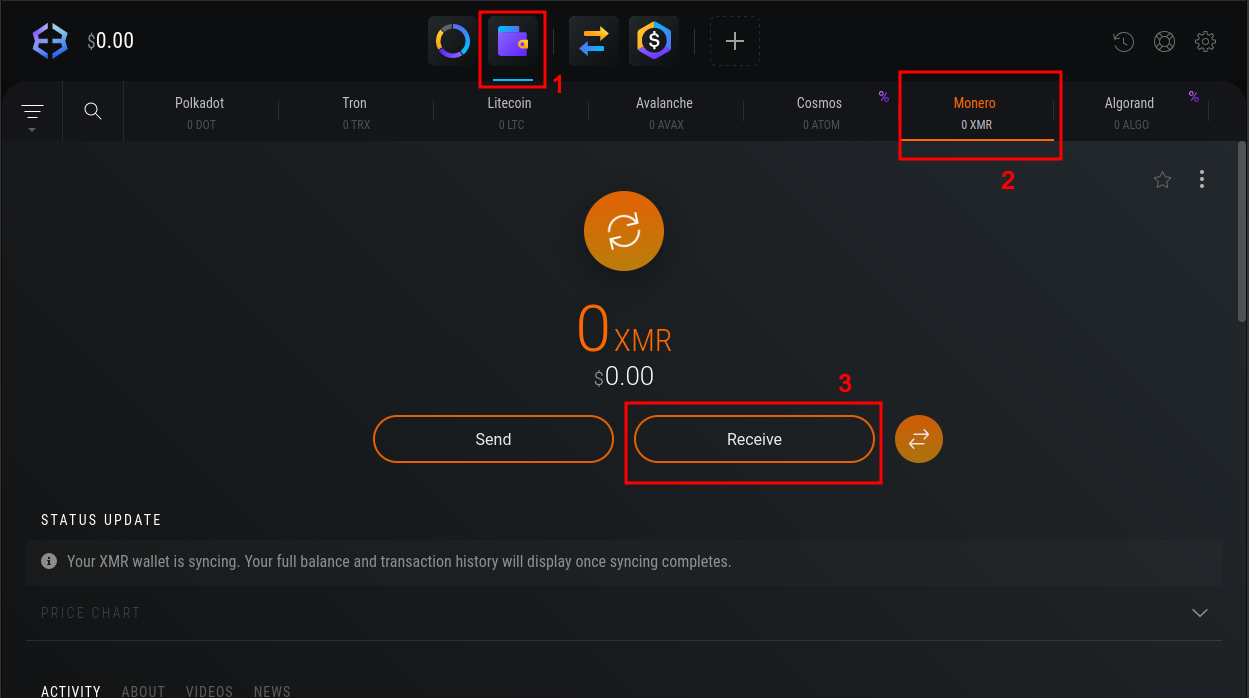
After you copy-paste the address, a new page will open where you will chat with the seller and also see general payment instructions on the right:

The discussion is normally going to be formal and short, something like:

*********************************
Buyer: Hello

Seller: Good morning/evening. Please send payment to:
(Inserts payment details to send the money over)

Buyer: Thanks. They should be sent in a few minutes

Seller: No worries

(Sending payment)

Buyer: Sent it. You should get them in seconds.

Seller: Received them. Thanks for the transaction.
*********************************
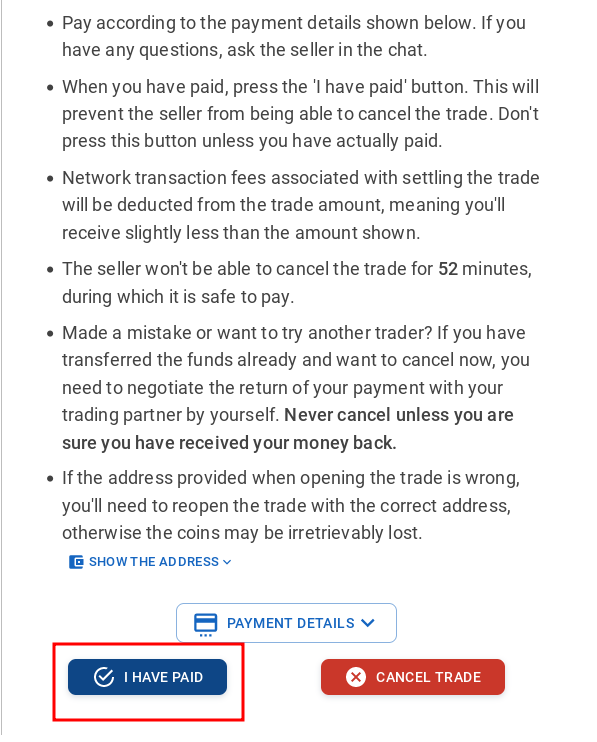
Once you have sent the money to the seller’s provided account, click “I HAVE PAID

When the payment is finalized, the seller will release the Monero and the above should pop up. It takes around 30 minutes for the Monero to reach your wallet.

If for any reasons the seller refuses to send the Monero (although highly unlikely) or you have any other issues with the seller, most transactions are protected by the platform and you can dispute the transaction live, in the same page where you chat with the seller:
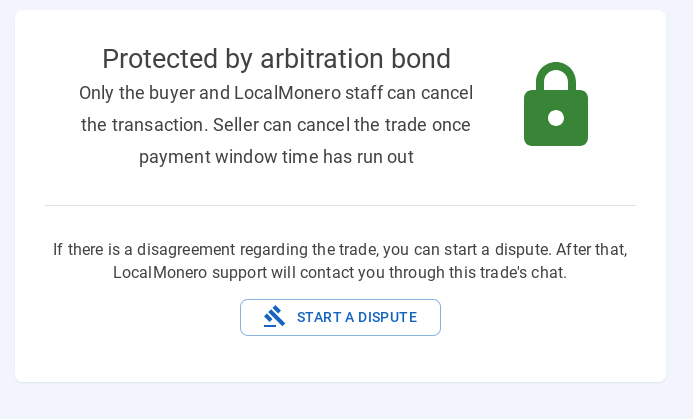
This is extremely unlikely. Transactions will go smooth for the most part as long as you send exactly the agreed amount. Scams are extremely rare in such platforms.

When the payment is finalized, this message will appear in the chat page:
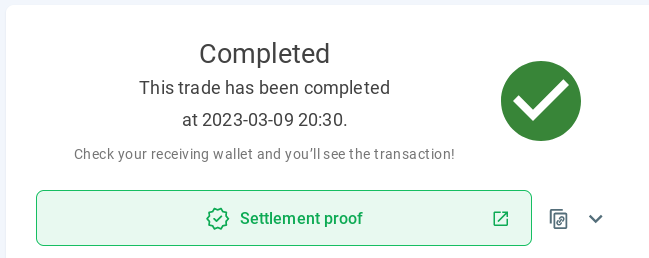
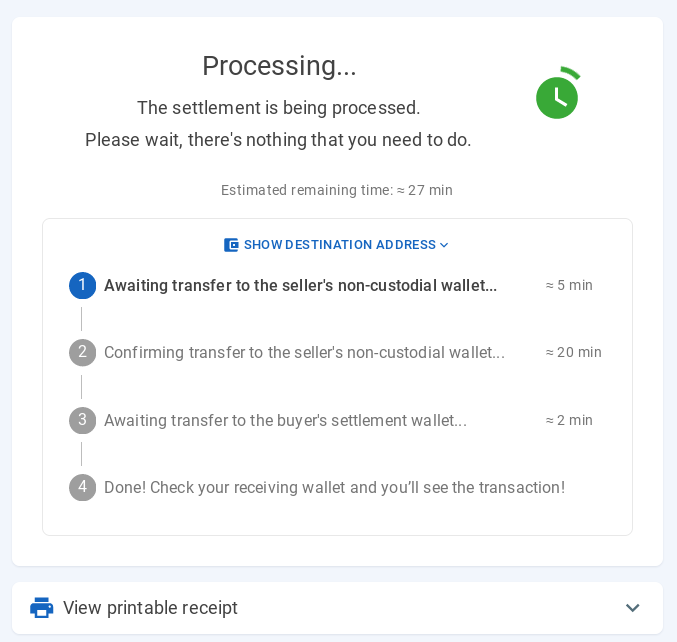
However you don’t need to wait 30 minutes on the page for this message. What you need to see is the “Processing” status where the seller released the Monero and are in the process of entering your wallet. You can close the page and log off once you see that, or you can wait if you desire to.

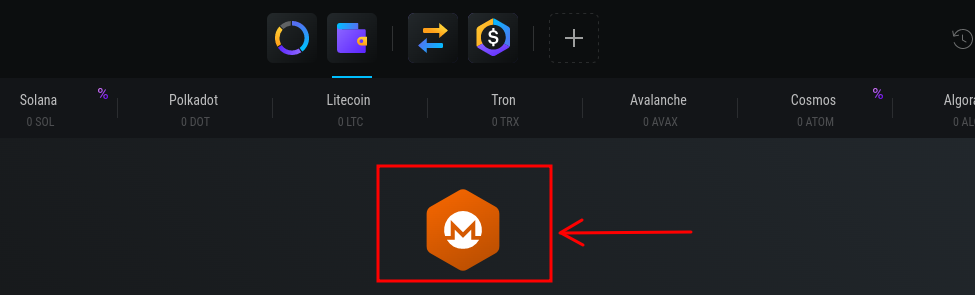
Before you can use Monero after they enter your wallet, you may need to update it with the latest Monero blockchain transactions. This is a privacy feature on Monero, which downloads the latest blockchain transactions (from the moment you do the first Monero transaction) on your computer. If it doesn’t start automatically, you can press the Monero coin button on your wallet and then press “Rescan”:
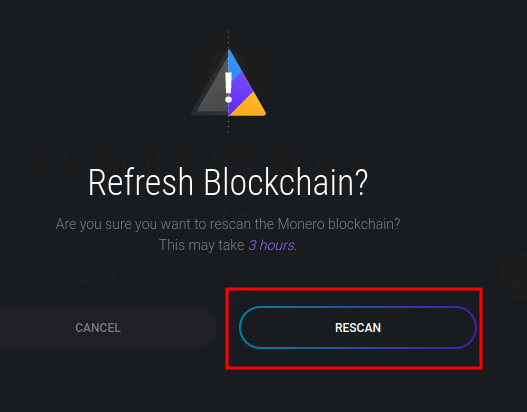
That’s all about it. Once the wallet is synced with the blockchain, you can use the monero for donations or buying a VPN or any other things that allow crypto-currency payments in Monero.

You can donate to JoS anonymously in this way as there is no ID required to set up any of the wallet or Local Monero account. Also the only thing that appears in your bank transaction list and bank statement is a transaction from you to the Monero seller which will have a normal random name or a random business name and there will be no mention of any crypto-currencies in the money transaction from you to them.

Basically your payment to the seller and the seller releasing the Monero to your wallet are two separate transactions, unrelated to each other in the sense that only the seller can link them together, and he cannot cause any harm to you as the seller will never ask and has no way to know what you will do with the Monero.

If needed you can also exchange Monero with any other coin that is supported by Exodus for a fee that depends on the amount to be exchanged. Not many services accept Monero so in the future you might come across situations where you will have to exchange Monero to other currencies. That or you might be able to find a platform where you can buy Bitcoin or other crypto-currencies in the same way you can buy Monero from LocalMonero.

The major advantage of buying Monero from a separate platform is that your Exodus wallet is therefore not linked back to your bank account or Paypall account or the method used. The seller may keep the transactions details for a few months but as far as they are concerned, we are just any other customers, random people that they trade with on a daily basis.

As a final note: these are two examples of sellers’ terms of trade that you need to avoid when looking for offers.
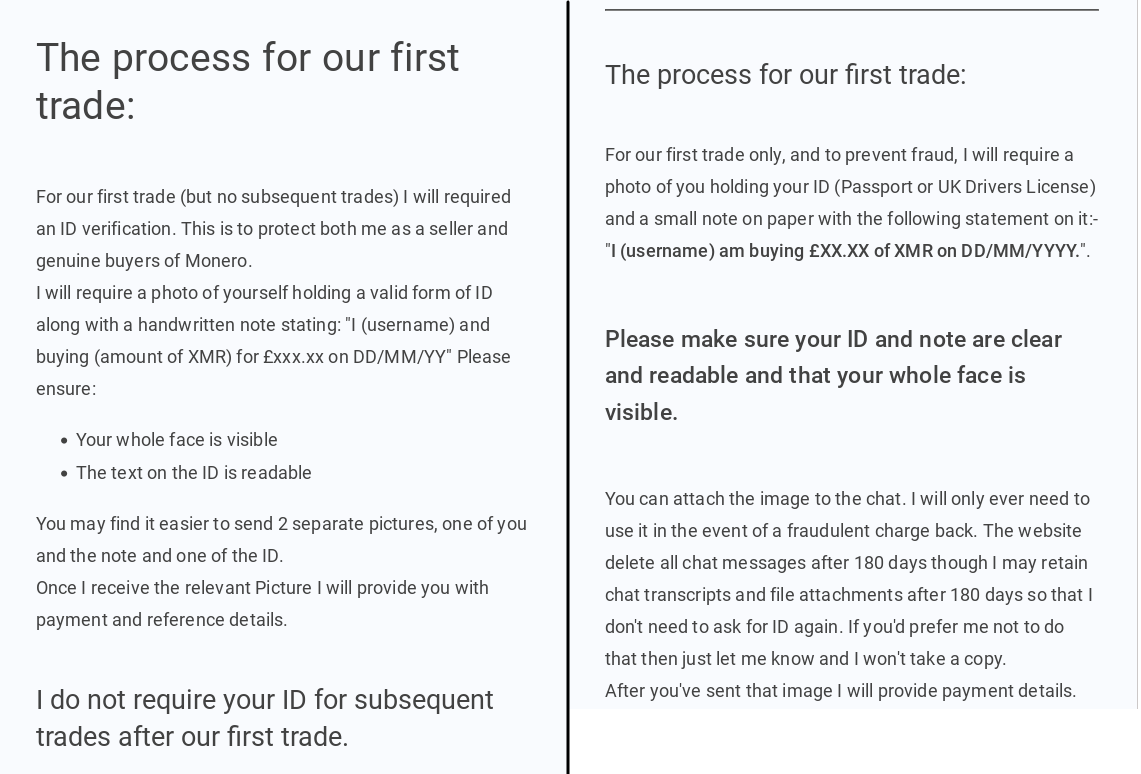
Is not necessarily dangerous to give out your ID this way but if is possible, then is definitely more safe to avoid these sellers. A general rule of thumb is that offers that don’t require ID are in most cases more expensive than the offers that do require a form of photographic ID. Personally I preferred to pay $10-20 more than giving out highly sensitive ID like passport or driving license or face photo.

If a trader doesn’t mention ID in the trade but they ask you for ID in the chat, simply tell them that there is no mention of ID required in the transaction description and that you are not giving ID away. If they don’t accept then you can cancel the trade with the seller and look for another trade.

For any Inquiries on Translations matters please message me on the Forums or Vultus Templorum or email me at [email protected]

#20

Hello. Yes as mentioned the platform Local Monero has been taken down however Bitvalve is a very similar alternative where the guide I've wrote still applies for the most part

Ok I'll note the steps for monero and apply them to Bitvalve, let you know when it's been done successfully. Thank you for the response.

#21

Excellent, I must look into Bitvalve. Thank you.

Interesting to see they accept/use gift cards - I guess it's clever way to get around being nagged at by banks.

#22

Hey there again, I'm getting a "user must log in" error on bitvalve. I'm using my protonmail account. Will I be needing a different phone number and phone for a private account setup? I already planned on doing this for a gmail/youtube private account to engage with the ToZ channel, but it seems I may have to use it for this too. I noticed the website notes the close relation to facebook, gmail, and so on.

#23

Hey there again, I'm getting a "user must log in" error on bitvalve. I'm using my protonmail account. Will I be needing a different phone number and phone for a private account setup? I already planned on doing this for a gmail/youtube private account to engage with the ToZ channel, but it seems I may have to use it for this too. I noticed the website notes the close relation to facebook, gmail, and so on.

You need to contact their customer support regarding issues on their platform.

#24

Hey there again, I'm getting a "user must log in" error on bitvalve. I'm using my protonmail account. Will I be needing a different phone number and phone for a private account setup? I already planned on doing this for a gmail/youtube private account to engage with the ToZ channel, but it seems I may have to use it for this too. I noticed the website notes the close relation to facebook, gmail, and so on.

Yes you would need to create an account on Bitvalve in order to use the platform. I will have a look if a phone number is mandatory or not. There might be ways around that if you cannot use your personal phone number.

For any Inquiries on Translations matters please message me on the Forums or Vultus Templorum or email me at [email protected]

#25

Yes you would need to create an account on Bitvalve in order to use the platform. I will have a look if a phone number is mandatory or not. There might be ways around that if you cannot use your personal phone number.

That isn't what I mean though, I tried to register for said account on their website, unless I was mistaken on what website I was on. I went on bitvalve.info and went into register. Upon trying to register with my protonmail account, i ran into "user must sign in" error, when in reality, I am trying to register for an account to sign in in the first place. Tried 4 different times with all their verification codes and didn't work. Is there a separate sign in to use? Do I need to download an app like exodus wallet? I know these are some rapid fire questions, but it is not in rudeness, just to get answers to move forward with this so the work can be completed.

Concerning the gmail/youtube issue, i have already ran into an issue trying to make a new email account with my protonmail and it will not allow a bypass of using a phone number, which is why I am opting to go with the pixel phone and use the private OS that was recommended by Adofo I believe, which will give me my phone number I need and not be as trackable as far as it seemed from the explanation. I have to buy the phone, figure out getting a sim card and all that, but that can be done in time. So it looks like my donations may go in starting with that event, along with my more private support of Temple of Zeus in public on youtube. Funny way of thinking about it, but that is how it is.

As far as contacting their customer support, in all of this I wish for privacy to move forward, and I would rather not have a message string between my private email and them, or anyone really unless it is necessary. I understand that there isn't anyone necessarily spying or stalking but the risk seems to be pretty high nowadays from what I have learned recently. This was the concern of that playlist issue the other week, though I have taken the time to download and then listen to all the Temple of Zeus videos on my phone while driving. Ready for round 2 and new videos, they are wonderful and believe they will inspire more to open their minds to the Truth. :cool:

#26

That isn't what I mean though, I tried to register for said account on their website, unless I was mistaken on what website I was on. I went on bitvalve.info and went into register. Upon trying to register with my protonmail account, i ran into "user must sign in" error, when in reality, I am trying to register for an account to sign in in the first place. Tried 4 different times with all their verification codes and didn't work. Is there a separate sign in to use? Do I need to download an app like exodus wallet? I know these are some rapid fire questions, but it is not in rudeness, just to get answers to move forward with this so the work can be completed.

Concerning the gmail/youtube issue, i have already ran into an issue trying to make a new email account with my protonmail and it will not allow a bypass of using a phone number, which is why I am opting to go with the pixel phone and use the private OS that was recommended by Adofo I believe, which will give me my phone number I need and not be as trackable as far as it seemed from the explanation. I have to buy the phone, figure out getting a sim card and all that, but that can be done in time. So it looks like my donations may go in starting with that event, along with my more private support of Temple of Zeus in public on youtube. Funny way of thinking about it, but that is how it is.

As far as contacting their customer support, in all of this I wish for privacy to move forward, and I would rather not have a message string between my private email and them, or anyone really unless it is necessary. I understand that there isn't anyone necessarily spying or stalking but the risk seems to be pretty high nowadays from what I have learned recently. This was the concern of that playlist issue the other week, though I have taken the time to download and then listen to all the Temple of Zeus videos on my phone while driving. Ready for round 2 and new videos, they are wonderful and believe they will inspire more to open their minds to the Truth. :cool:

I see what you mean I will have a look as well and see whether there any obstacles in creating an account

For any Inquiries on Translations matters please message me on the Forums or Vultus Templorum or email me at [email protected]

#27

That isn't what I mean though, I tried to register for said account on their website, unless I was mistaken on what website I was on. I went on bitvalve.info and went into register. Upon trying to register with my protonmail account, i ran into "user must sign in" error, when in reality, I am trying to register for an account to sign in in the first place. Tried 4 different times with all their verification codes and didn't work. Is there a separate sign in to use? Do I need to download an app like exodus wallet? I know these are some rapid fire questions, but it is not in rudeness, just to get answers to move forward with this so the work can be completed.

Concerning the gmail/youtube issue, i have already ran into an issue trying to make a new email account with my protonmail and it will not allow a bypass of using a phone number, which is why I am opting to go with the pixel phone and use the private OS that was recommended by Adofo I believe, which will give me my phone number I need and not be as trackable as far as it seemed from the explanation. I have to buy the phone, figure out getting a sim card and all that, but that can be done in time. So it looks like my donations may go in starting with that event, along with my more private support of Temple of Zeus in public on youtube. Funny way of thinking about it, but that is how it is.

As far as contacting their customer support, in all of this I wish for privacy to move forward, and I would rather not have a message string between my private email and them, or anyone really unless it is necessary. I understand that there isn't anyone necessarily spying or stalking but the risk seems to be pretty high nowadays from what I have learned recently. This was the concern of that playlist issue the other week, though I have taken the time to download and then listen to all the Temple of Zeus videos on my phone while driving. Ready for round 2 and new videos, they are wonderful and believe they will inspire more to open their minds to the Truth. :cool:

Hello. This is the site you would need to register to
https://www.bitvalve.com/

I had a look and you will indeed need a phone number alongside an email address. However you don't have to use your own number or email address, you can create another email address to use only to buy cryptocurrency and for a phone number you can either by a sim from a local store if that's free to buy without involving any sort of ID registration or you may be able to use an online temporary phone number such as these ones
https://receive-smss.com/
In order to receive a code on one of them to use in order to set up your account. From what I can see you will not need the phone number to log in afterwards but you will receive confirmation codes on your email address.

Also yes you will need a wallet, Exodus is convenient and easy to use and also it supports most crypto coins and is also free to install.

For any Inquiries on Translations matters please message me on the Forums or Vultus Templorum or email me at [email protected]

#28

Hello. This is the site you would need to register to
https://www.bitvalve.com/

I had a look and you will indeed need a phone number alongside an email address. However you don't have to use your own number or email address, you can create another email address to use only to buy cryptocurrency and for a phone number you can either by a sim from a local store if that's free to buy without involving any sort of ID registration or you may be able to use an online temporary phone number such as these ones
https://receive-smss.com/
In order to receive a code on one of them to use in order to set up your account. From what I can see you will not need the phone number to log in afterwards but you will receive confirmation codes on your email address.

Also yes you will need a wallet, Exodus is convenient and easy to use and also it supports most crypto coins and is also free to install.

Excellent, thank you for that. I have exodus set up. I'll get on top of this as soon as I am able. I will try the sms thing, though I really liked the idea of the whole ungoogled OS on the google pixel phones, will likely give both a try and report my results when I'm done. The fear that existed before has really undergone a transformation to excitement in all of this.

Have a nice rest of your day

Thank you again for your guidance on the subject

#29

Do not hesitate to ask any questions you might have. It might seem long but is very easy to follow and apply. Once you do 1-2 transactions you will get used to it straight away.

____________________________________

Exodus is said to still be #1 but I have found 'MyMonero' to be more user friendly, reliable and doesn't require any personal details or identification.
https://play.google.com/store/apps/details?id=com.mymonero.official_android_application

#30

Excellent, thank you for that. I have exodus set up. I'll get on top of this as soon as I am able. I will try the sms thing, though I really liked the idea of the whole ungoogled OS on the google pixel phones, will likely give both a try and report my results when I'm done. The fear that existed before has really undergone a transformation to excitement in all of this.

Have a nice rest of your day

Thank you again for your guidance on the subject

It is indeed de-googled however I found that many apps that you commonly need on your phone come with google trackers and analytics however these are quite useless when you don't have to register with a google account to begin with (on this phone you don't have to register with any account at all if you don't want to). Also comes pre-installed with a hide your location and hide your IP feature. I imagine though the de-googled Google Pixel will be very similar.

Hermodur666said:post: 1137062

Exodus is said to still be #1 but I have found 'MyMonero' to be more user friendly, reliable and doesn't require any personal details or identification.
https://play.google.com/store/apps/details?id=com.mymonero.official_android_application

Seems a good wallet indeed. Is good if Monero is the only coin you are trading, many wallets support most coins simultaneously.

For any Inquiries on Translations matters please message me on the Forums or Vultus Templorum or email me at [email protected]

#31

Yes, and synchronises with windows 10-11. Download from Google Play Store:

So for me to be using exodus on my mobile I have to also download windows 10 or 11 ?

#32

There are dozen + options with these, the above-mentioned are not the only ones. Use search engines and language models to aid you in studying the subject. Support sections of websites also contain a lot of useful information. Generally, buying with either a credit or debit card is very commonplace and easy. The same with a direct bank transfer.

#33

I am still having issues moving forward with this, but will still post when I have found a resolution for issues moving forward. I am serious on donating, but google has created some bad roadblocks with their involvement. Again I will post when I have successfully done the work.

#34

It is indeed de-googled however I found that many apps that you commonly need on your phone come with google trackers and analytics however these are quite useless when you don't have to register with a google account to begin with (on this phone you don't have to register with any account at all if you don't want to). Also comes pre-installed with a hide your location and hide your IP feature. I imagine though the de-googled Google Pixel will be very similar.

Seems a good wallet indeed. Is good if Monero is the only coin you are trading, many wallets support most coins simultaneously.

I sent a message to the donations email, I understand everyone is very busy, but wanted to you know, since we have been in contact here about this, and also have the ability to let other members of the Leadership here know of a few things. Thank you again for your help, and also everyone here who contributed to offer advice as well.

#35

Do not hesitate to ask any questions you might have. It might seem long but is very easy to follow and apply. Once you do 1-2 transactions you will get used to it straight away.

____________________________________

Hi there again Temple Guardian. I have decided on just going with donating without the concern of anonymity. It bothered me, perhaps bothers me, though it really does not matter, the times are the times, that I was not able to accomplish what I wanted in those parameters, but, at the same time I do believe there will be a better opening to accomplish this later when it matters more. The situation has definitely caused me to remember what needs to be done and how, but the work and life situation I am in has not permitted me that ability at this given time.

I had messaged the donation email awhile back on the more specific details, and the concerns I had in regards to a life event passing has now been completed. I will proceed at a little bit of a slower pace, but hold to my word concerning the circumstances of not being able to use the above method at this time.

I am posting this to again, say thank you, to everyone here who tried to help, I have a good idea what I will be able to do when I am able to seize that moment that I am. I do not wish to waste anymore time with something I wished to accomplish a long time ago, but atleast here we are today.

I am also posting this to notify my donation will be coming in once a month until November this year, after that will be something I will need to plan for further. I did not want this to go into one of HPHoodedCobra666s sermons to not take attention away from the original post.

Thank you again Brother, and through some recent experiences, I have learned that I really should not be afraid, so long as I am not throwing personal information around. I know others have said it, but to live it, on the inside of the soul, I'm sure we understand, is different than agreeing with someone about the subject. Just frustrating there is so much google garbage blocking the ease of making private accounts.

Hail Satya
Hail Zeus

#36

Also, I wanted to note I have to use another email account. I message High Priest Zevios Metathronos on the situation. Please advise if I should resend the emails to another place for confirmation. Exodus wallet/ramp will not allow a change of state in regards to your location after you have assigned it to an email. So I had to use my other proton email I made for private accounts I had planned on making with the anonymous phone method(s) that have been given. In the meantime, at least it is good for something. I confirmed both emails to the Cobra Army email that goes to the High Priest directly.

#37

Correction, I just figured out it asked me another time. I will continue using the alternate email either way, but will likely switch back to the other email if this is not an ongoing issue.

#38

Alright, so where I am at currently on donating is this. I got into exodus wallet. I tried to buy bitcoin to send over, managed to use this current email instead of the alternate. It took me to this "Ramp" website that is pretty much asking me where I live, wants a picture of my face, both sides of my ID, and who knows what else, my computers camera is busted as I realized through trying to get this done and I'm not sure what else I can do. It almost makes me want to go back to using Trustwallet, though thats directly in my personal phone, and I remember moonpay only let me send some... 50 bucks at a time, some nonsense like that.

Please excuse me if I sound sharp, it is not you, it is none of the ToZ, it is not anyone else I am blaming this on besides just the situation being unfortunate, and also myself clearly being illiterate in this. Beyond that the damned enemy for having us have to put up with such garbage, an extreme understatement.

In the next few days when Im able I'll try to reread some of this so I can begin to credit my exodus wallet with what will likely be a bit more of an intrusive method so I can get this done. To not be able to do this in a time where I am now able feels pretty rough when it was something I spoke of doing and promised myself I would do all these years, but I'm going to keep trying to find the answer, the way forward.

I will continue trying between my other obligations, though, with the different attempts I have made, I really have made this an obligation as well.

Hail Satya
Hail Zeus

#39
This is the targeted message.

Hi there again Temple Guardian. I have decided on just going with donating without the concern of anonymity. It bothered me, perhaps bothers me, though it really does not matter, the times are the times, that I was not able to accomplish what I wanted in those parameters, but, at the same time I do believe there will be a better opening to accomplish this later when it matters more. The situation has definitely caused me to remember what needs to be done and how, but the work and life situation I am in has not permitted me that ability at this given time.

I had messaged the donation email awhile back on the more specific details, and the concerns I had in regards to a life event passing has now been completed. I will proceed at a little bit of a slower pace, but hold to my word concerning the circumstances of not being able to use the above method at this time.

I am posting this to again, say thank you, to everyone here who tried to help, I have a good idea what I will be able to do when I am able to seize that moment that I am. I do not wish to waste anymore time with something I wished to accomplish a long time ago, but atleast here we are today.

Greetings @TheVoiceOfVictory
Have you tried to install the wallet and didn't work or could not register on a platform to buy crypto? I have successfully used Bitvalve recently and it worked exactly as Local Monero used to work. By the way no real life information is needed at all to set up a wallet or register to a platform apart from when you send the money to the person sending you the crypto, which is completely separate from the wallet and platform themselves as it's only a private transaction from you to the seller.

By the way have you tried to buy Bitcoin from Exodus itself? You need to buy from a crypto trading platform, specifically from sellers that do not request ID verification. Have you tried to join one so far?

For any Inquiries on Translations matters please message me on the Forums or Vultus Templorum or email me at [email protected]